Prerequisites
Have the following available and ready:- AWS Account with appropriate permissions
- EC2 Key Pair
- Fill out with your specific information.
aws ec2 describe-key-pairs
  	--region us-east-1 aws ec2 create-key-pair \
  	--key-name my-memmachine-key \
  	--region us-east-1 \
  	--query 'KeyMaterial' \
  	--output text > my-memmachine-key.pem
chmod 400 my-memmachine-key.pem
- OpenAI API Key — required for embeddings.
-
Determine
STACK_NAME- you will need to use the same name for this parameter throughout deployment.
- You can call the file whatever you like. In this example, we are using
memmachine-ec2-stackoryour-stack-name.
If you choose to use a different name, make sure any reference tomemmachine-ec2-stackoryour-stack-nameis replaced by your chosen stack name.
-
Cloud Formation Template - see code block below
- Use the copy feature below and paste into your own file
- Be sure to fill out witih your specific information where applicable
AWSTemplateFormatVersion: '2010-09-09'
Description: 'MemMachine - Simple EC2 Deployment with Docker Compose'

Parameters:
  StackName:
    Type: String
    Default: memmachine-ec2-stack
    Description: Name for the CloudFormation stack

  InstanceType:
    Type: String
    Default: t3.xlarge
    AllowedValues: [t3.medium, t3.large, t3.xlarge, t3.2xlarge, m5.large, m5.xlarge, m5.2xlarge]
    Description: EC2 instance type

  KeyPairName:
    Type: AWS::EC2::KeyPair::KeyName
    Description: Name of an existing EC2 KeyPair to enable SSH access

  PostgresPassword:
    Type: String
    NoEcho: true
    MinLength: 8
    Description: PostgreSQL database password

  Neo4jPassword:
    Type: String
    NoEcho: true
    MinLength: 8
    Description: Neo4j database password

  OpenAIApiKey:
    Type: String
    NoEcho: true
    Description: OpenAI API Key for embeddings and LLM

  AllowedCIDR:
    Type: String
    Default: 0.0.0.0/0
    Description: CIDR block allowed to access the application (use 0.0.0.0/0 for public access)

Resources:
  # VPC
  VPC:
    Type: AWS::EC2::VPC
    Properties:
      CidrBlock: 10.0.0.0/16
      EnableDnsHostnames: true
      EnableDnsSupport: true
      Tags:
        - Key: Name
          Value: !Sub '${StackName}-vpc'

  InternetGateway:
    Type: AWS::EC2::InternetGateway
    Properties:
      Tags:
        - Key: Name
          Value: !Sub '${StackName}-igw'

  InternetGatewayAttachment:
    Type: AWS::EC2::VPCGatewayAttachment
    Properties:
      InternetGatewayId: !Ref InternetGateway
      VpcId: !Ref VPC

  # Public Subnet
  PublicSubnet:
    Type: AWS::EC2::Subnet
    Properties:
      VpcId: !Ref VPC
      AvailabilityZone: !Select [0, !GetAZs '']
      CidrBlock: 10.0.0.0/24
      MapPublicIpOnLaunch: true
      Tags:
        - Key: Name
          Value: !Sub '${StackName}-public-subnet'

  PublicSubnet2:
    Type: AWS::EC2::Subnet
    Properties:
      VpcId: !Ref VPC
      AvailabilityZone: !Select [1, !GetAZs '']
      CidrBlock: 10.0.1.0/24
      MapPublicIpOnLaunch: true
      Tags:
        - Key: Name
          Value: !Sub '${StackName}-public-subnet-2'

  # Route Table
  PublicRouteTable:
    Type: AWS::EC2::RouteTable
    Properties:
      VpcId: !Ref VPC
      Tags:
        - Key: Name
          Value: !Sub '${StackName}-public-routes'

  DefaultPublicRoute:
    Type: AWS::EC2::Route
    DependsOn: InternetGatewayAttachment
    Properties:
      RouteTableId: !Ref PublicRouteTable
      DestinationCidrBlock: 0.0.0.0/0
      GatewayId: !Ref InternetGateway

  PublicSubnetRouteTableAssociation:
    Type: AWS::EC2::SubnetRouteTableAssociation
    Properties:
      RouteTableId: !Ref PublicRouteTable
      SubnetId: !Ref PublicSubnet

  PublicSubnet2RouteTableAssociation:
    Type: AWS::EC2::SubnetRouteTableAssociation
    Properties:
      RouteTableId: !Ref PublicRouteTable
      SubnetId: !Ref PublicSubnet2

  # Security Group
  MemMachineSecurityGroup:
    Type: AWS::EC2::SecurityGroup
    Properties:
      GroupName: !Sub '${StackName}-sg'
      GroupDescription: Security group for MemMachine EC2 instance
      VpcId: !Ref VPC
      SecurityGroupIngress:
        - IpProtocol: tcp
          FromPort: 22
          ToPort: 22
          CidrIp: !Ref AllowedCIDR
          Description: SSH access
        - IpProtocol: tcp
          FromPort: 8080
          ToPort: 8080
          CidrIp: 10.0.0.0/16
          Description: MemMachine API from VPC only
        - IpProtocol: tcp
          FromPort: 7474
          ToPort: 7474
          CidrIp: !Ref AllowedCIDR
          Description: Neo4j HTTP
        - IpProtocol: tcp
          FromPort: 7687
          ToPort: 7687
          CidrIp: !Ref AllowedCIDR
          Description: Neo4j Bolt
      SecurityGroupEgress:
        - IpProtocol: -1
          CidrIp: 0.0.0.0/0
      Tags:
        - Key: Name
          Value: !Sub '${StackName}-sg'

  # IAM Role for EC2
  EC2Role:
    Type: AWS::IAM::Role
    Properties:
      RoleName: !Sub '${StackName}-ec2-role'
      AssumeRolePolicyDocument:
        Version: '2012-10-17'
        Statement:
          - Effect: Allow
            Principal:
              Service: ec2.amazonaws.com
            Action: sts:AssumeRole
      ManagedPolicyArns:
        - arn:aws:iam::aws:policy/AmazonSSMManagedInstanceCore
      Policies:
        - PolicyName: CloudWatchLogs
          PolicyDocument:
            Version: '2012-10-17'
            Statement:
              - Effect: Allow
                Action:
                  - logs:CreateLogGroup
                  - logs:CreateLogStream
                  - logs:PutLogEvents
                  - logs:DescribeLogStreams
                Resource: '*'

  EC2InstanceProfile:
    Type: AWS::IAM::InstanceProfile
    Properties:
      Roles:
        - !Ref EC2Role

  # CloudWatch Log Group
  MemMachineLogGroup:
    Type: AWS::Logs::LogGroup
    Properties:
      LogGroupName: !Sub '/memmachine/${StackName}'
      RetentionInDays: 30


  MemMachineNLB:
    Type: AWS::ElasticLoadBalancingV2::LoadBalancer
    Properties:
      Name: !Sub '${StackName}-nlb'
      Type: network
      Scheme: internal
      Subnets:
        - !Ref PublicSubnet
        - !Ref PublicSubnet2

  MemMachineTargetGroup:
    Type: AWS::ElasticLoadBalancingV2::TargetGroup
    Properties:
      Name: !Sub '${StackName}-tg'
      Port: 8080
      Protocol: TCP
      TargetType: instance
      VpcId: !Ref VPC
      HealthCheckPort: '8080'
      HealthCheckProtocol: TCP
      Targets:
        - Id: !Ref MemMachineInstance
          Port: 8080

  MemMachineNLBListener:
    Type: AWS::ElasticLoadBalancingV2::Listener
    Properties:
      DefaultActions:
        - Type: forward
          TargetGroupArn: !Ref MemMachineTargetGroup
      LoadBalancerArn: !Ref MemMachineNLB
      Port: 8080
      Protocol: TCP

  MemMachineVpcLink:
    Type: AWS::ApiGatewayV2::VpcLink
    Properties:
      Name: !Sub '${StackName}-vpclink'
      SubnetIds:
        - !Ref PublicSubnet
        - !Ref PublicSubnet2

  MemMachineHttpApi:
    Type: AWS::ApiGatewayV2::Api
    Properties:
      Name: !Sub '${StackName}-http-api'
      ProtocolType: HTTP

  MemMachineIntegration:
    Type: AWS::ApiGatewayV2::Integration
    Properties:
      ApiId: !Ref MemMachineHttpApi
      IntegrationType: HTTP_PROXY
      IntegrationMethod: ANY
      ConnectionType: VPC_LINK
      ConnectionId: !Ref MemMachineVpcLink
      IntegrationUri: !Ref MemMachineNLBListener
      PayloadFormatVersion: '1.0'

  MemMachineRoute:
    Type: AWS::ApiGatewayV2::Route
    Properties:
      ApiId: !Ref MemMachineHttpApi
      RouteKey: 'ANY /{proxy+}'
      Target: !Sub 'integrations/${MemMachineIntegration}'

  MemMachineStage:
    Type: AWS::ApiGatewayV2::Stage
    Properties:
      ApiId: !Ref MemMachineHttpApi
      StageName: '$default'
      AutoDeploy: true

  MemMachineInstance:
    Type: AWS::EC2::Instance
    Properties:
      ImageId: !Sub '{{resolve:ssm:/aws/service/ami-amazon-linux-latest/amzn2-ami-hvm-x86_64-gp2}}'
      InstanceType: !Ref InstanceType
      KeyName: !Ref KeyPairName
      SubnetId: !Ref PublicSubnet
      SecurityGroupIds:
        - !Ref MemMachineSecurityGroup
      IamInstanceProfile: !Ref EC2InstanceProfile
      UserData:
        Fn::Base64: !Sub |
          #!/bin/bash
          set -e

          # Update system
          yum update -y

          # Install CloudFormation helper scripts
          yum install -y aws-cfn-bootstrap

          # Install Docker
          yum install -y docker
          systemctl start docker
          systemctl enable docker
          usermod -a -G docker ec2-user

          # Install Docker Compose
          curl -L "https://github.com/docker/compose/releases/latest/download/docker-compose-$(uname -s)-$(uname -m)" -o /usr/local/bin/docker-compose
          chmod +x /usr/local/bin/docker-compose
          ln -s /usr/local/bin/docker-compose /usr/bin/docker-compose

          # Install Git
          yum install -y git

          # Create application directory
          mkdir -p /opt/memmachine
          cd /opt/memmachine

          # Create docker-compose.yml
          cat > docker-compose.yml << 'COMPOSEEOF'
          services:
            postgres:
              image: pgvector/pgvector:pg16
              container_name: memmachine-postgres
              restart: unless-stopped
              ports:
                - "5432:5432"
              environment:
                POSTGRES_DB: memmachine
                POSTGRES_USER: memmachine
                POSTGRES_PASSWORD: POSTGRES_PASSWORD_PLACEHOLDER
                POSTGRES_INITDB_ARGS: "--encoding=UTF-8 --lc-collate=C --lc-ctype=C"
              volumes:
                - postgres_data:/var/lib/postgresql/data
              healthcheck:
                test: ["CMD-SHELL", "pg_isready -U memmachine -d memmachine"]
                interval: 10s
                timeout: 5s
                retries: 5
                start_period: 30s
              networks:
                - memmachine-network

            neo4j:
              image: neo4j:5.23-community
              container_name: memmachine-neo4j
              restart: unless-stopped
              ports:
                - "7474:7474"
                - "7473:7473"
                - "7687:7687"
              environment:
                NEO4J_EDITION: community
                NEO4J_AUTH: neo4j/NEO4J_PASSWORD_PLACEHOLDER
                NEO4J_server_bolt_thread__pool__max__size: 2000
                NEO4J_server_memory_heap_initial__size: 512m
                NEO4J_server_memory_heap_max__size: 1G
                NEO4J_server_default__listen__address: 0.0.0.0
                NEO4J_server_bolt_listen__address: 0.0.0.0:7687
                NEO4J_server_http_listen__address: 0.0.0.0:7474
                NEO4J_server_https_listen__address: 0.0.0.0:7473
                NEO4J_PLUGINS: '["apoc", "graph-data-science"]'
              volumes:
                - neo4j_data:/data
                - neo4j_logs:/logs
                - neo4j_import:/var/lib/neo4j/import
                - neo4j_plugins:/plugins
              healthcheck:
                test: ["CMD", "cypher-shell", "-u", "neo4j", "-p", "NEO4J_PASSWORD_PLACEHOLDER", "RETURN 1"]
                interval: 30s
                timeout: 10s
                retries: 5
                start_period: 30s
              networks:
                - memmachine-network

            memmachine:
              image: public.ecr.aws/v3z9g9t6/memmachine-v2:latest-cpu
              container_name: memmachine-app
              restart: unless-stopped
              ports:
                - "8080:8080"
              environment:
                POSTGRES_HOST: postgres
                POSTGRES_PORT: 5432
                POSTGRES_USER: memmachine
                POSTGRES_PASSWORD: POSTGRES_PASSWORD_PLACEHOLDER
                POSTGRES_DB: memmachine
                NEO4J_HOST: neo4j
                NEO4J_PORT: 7687
                NEO4J_USER: neo4j
                NEO4J_PASSWORD: NEO4J_PASSWORD_PLACEHOLDER
                MEMORY_CONFIG: /app/configuration.yml
                MCP_BASE_URL: http://localhost:8080
                GATEWAY_URL: http://localhost:8080
                FAST_MCP_LOG_LEVEL: INFO
                OPENAI_API_KEY: OPENAI_API_KEY_PLACEHOLDER
                LOG_LEVEL: INFO
              volumes:
                - memmachine_logs:/tmp/memory_logs
              depends_on:
                postgres:
                  condition: service_healthy
                neo4j:
                  condition: service_healthy
              healthcheck:
                test: ["CMD", "curl", "--fail", "--silent", "http://localhost:8080/api/v2/health"]
                interval: 30s
                timeout: 10s
                retries: 3
                start_period: 60s
              networks:
                - memmachine-network

          volumes:
            postgres_data:
            neo4j_data:
            neo4j_logs:
            neo4j_import:
            neo4j_plugins:
            memmachine_logs:

          networks:
            memmachine-network:
              driver: bridge
          COMPOSEEOF

          # Replace password placeholders in docker-compose.yml
          sed -i "s|POSTGRES_PASSWORD_PLACEHOLDER|${PostgresPassword}|g" docker-compose.yml
          sed -i "s|NEO4J_PASSWORD_PLACEHOLDER|${Neo4jPassword}|g" docker-compose.yml
          sed -i "s|OPENAI_API_KEY_PLACEHOLDER|${OpenAIApiKey}|g" docker-compose.yml

          # Create .env file with actual values
          cat > .env << 'ENVEOF'
          POSTGRES_PASSWORD=PLACEHOLDER_POSTGRES
          NEO4J_PASSWORD=PLACEHOLDER_NEO4J
          OPENAI_API_KEY=PLACEHOLDER_OPENAI
          ENVEOF

          # Replace placeholders with actual values
          sed -i "s|PLACEHOLDER_POSTGRES|${PostgresPassword}|g" .env
          sed -i "s|PLACEHOLDER_NEO4J|${Neo4jPassword}|g" .env
          sed -i "s|PLACEHOLDER_OPENAI|${OpenAIApiKey}|g" .env

          # Create configuration.yml file with actual values (using proper YAML escaping)
          cat > configuration.yml << 'CONFIGEOF'
          logging:
            path: mem-machine.log
            level: info #| debug | error

          episode_store:
            database: profile_storage

          episodic_memory:
            long_term_memory:
              embedder: openai_embedder
              reranker: my_reranker_id
              vector_graph_store: my_storage_id
            short_term_memory:
              llm_model: openai_model
              message_capacity: 500

          semantic_memory:
            llm_model: openai_model
            embedding_model: openai_embedder
            database: profile_storage

          session_manager:
            database: profile_storage

          prompt:
            session:
            - profile_prompt


          resources:
            databases:
              profile_storage:
                provider: postgres
                config:
                  host: postgres
                  port: 5432
                  user: memmachine
                  password: POSTGRES_PASSWORD_PLACEHOLDER
                  db_name: memmachine
              my_storage_id:
                provider: neo4j
                config:
                  uri: 'bolt://neo4j:7687'
                  username: neo4j
                  password: NEO4J_PASSWORD_PLACEHOLDER
              sqlite_test:
                provider: sqlite
                config:
                  path: sqlite_test.db
            embedders:
              openai_embedder:
                provider: openai
                config:
                  model: "text-embedding-3-small"
                  api_key: OPENAI_API_KEY_PLACEHOLDER
                  base_url: "https://api.openai.com/v1"
                  dimensions: 1536
            language_models:
              openai_model:
                provider: openai-responses
                config:
                  model: "gpt-4o-mini"
                  api_key: OPENAI_API_KEY_PLACEHOLDER
                  base_url: "https://api.openai.com/v1"
            rerankers:
              my_reranker_id:
                provider: "rrf-hybrid"
                config:
                  reranker_ids:
                    - id_ranker_id
                    - bm_ranker_id
              id_ranker_id:
                provider: "identity"
              bm_ranker_id:
                provider: "bm25"

          CONFIGEOF

          # Replace placeholders in configuration.yml (using proper escaping for sed)
          sed -i "s|OPENAI_API_KEY_PLACEHOLDER|$(echo '${OpenAIApiKey}' | sed 's/[[\.*^$()+?{|]/\\&/g')|g" configuration.yml
          sed -i "s|NEO4J_PASSWORD_PLACEHOLDER|$(echo '${Neo4jPassword}' | sed 's/[[\.*^$()+?{|]/\\&/g')|g" configuration.yml
          sed -i "s|POSTGRES_PASSWORD_PLACEHOLDER|$(echo '${PostgresPassword}' | sed 's/[[\.*^$()+?{|]/\\&/g')|g" configuration.yml

          # Update docker-compose.yml to mount configuration.yml
          sed -i '/memmachine_logs:\/tmp\/memory_logs/a\      - .\/configuration.yml:\/app\/configuration.yml:ro' docker-compose.yml

          # Start services
          docker-compose up -d

          # Wait for services to be healthy
          echo "Waiting for services to start..."
          sleep 30

          # Log status
          docker-compose ps >> /var/log/memmachine-startup.log 2>&1

          # Send completion signal to CloudFormation
          /opt/aws/bin/cfn-signal -e $? --stack ${AWS::StackName} --resource MemMachineInstance --region ${AWS::Region} || true
      Tags:
        - Key: Name
          Value: !Sub '${StackName}-instance'

Outputs:
    InstanceId:
        Description: EC2 Instance ID
        Value: !Ref MemMachineInstance

    PublicIP:
        Description: Public IP address
        Value: !GetAtt MemMachineInstance.PublicIp

    PublicDNS:
        Description: Public DNS name
        Value: !GetAtt MemMachineInstance.PublicDnsName

    ApplicationURL:
        Description: MemMachine Application URL (via API Gateway)
        Value: !Sub 'https://${MemMachineHttpApi}.execute-api.${AWS::Region}.amazonaws.com/docs'

    HealthCheckURL:
        Description: Health Check Endpoint
        Value: !Sub 'http://${MemMachineInstance.PublicIp}:8080/api/v2/health'

    Neo4jBrowserURL:
        Description: Neo4j Browser URL
        Value: !Sub 'http://${MemMachineInstance.PublicIp}:7474'

    SSHAccess:
        Description: SSH command to access the instance
        Value: !Sub 'ssh -i <your-key.pem> ec2-user@${MemMachineInstance.PublicIp}'
Deployment Methods
- Method 1: AWS CLI
- Method 2: AWS Console GUI
Prerequisites:Process:
Expected Outputs include:
- AWS CLI installed and configured
- To check your version, use the following commands:
aws --version
- macOS:
brew install awscli - Linux: AWS CLI Installation Guide
- AWS Credentials Configuration:
  aws configure
    # Enter:
    # AWS Access Key ID
    # AWS Secret Access Key
    # Default region (e.g., us-east-1)
    # Default output format (json)
  aws sts get-caller-identity
Make sure to replace
your-cft-template.yaml , your-stack-name and your-key-pair with the values you are using.1
Set Parameters
aws configure
    STACK_NAME="your-stack-name"
    REGION="us-east-1"
    KEY_PAIR="your-key-pair"
    POSTGRES_PASSWORD="YourSecurePassword123"
    NEO4J_PASSWORD="YourSecurePassword123"
    OPENAI_API_KEY="sk-your-openai-key-here"
    INSTANCE_TYPE="t3.xlarge"
    ELASTIC_IP="false"
    ALLOWED_CIDR="0.0.0.0/0"
2
Deploy Stack
aws cloudformation create-stack \
    --stack-name $STACK_NAME \
    --template-body file://your-cft-template.yaml \
    --parameters ParameterKey=StackName,ParameterValue=$STACK_NAME \
                 ParameterKey=InstanceType,ParameterValue=$INSTANCE_TYPE \
                 ParameterKey=KeyPairName,ParameterValue=$_KEY_PAIR \
                 ParameterKey=PostgresPassword,ParameterValue=$POSTGRES_PASSWORD \
                 ParameterKey=Neo4jPassword,ParameterValue=$NEO4J_PASSWORD \
                 ParameterKey=OpenAIApiKey,ParameterValue=$OPENAI_API_KEY \
                 ParameterKey=AllowedCIDR,ParameterValue=$_ALLOWED_CIDR \
                 ParameterKey=ElasticIP,ParameterValue=$_ELASTIC_IP \
    --capabilities CAPABILITY_NAMED_IAM \
    --region $REGION
3
Monitor Stack
aws cloudformation describe-stacks \
   --stack-name $STACK_NAME
   --region $REGION
   --query 'Stacks[0].StackStatus'
   --output text aws cloudformation wait stack-create-complete \
   --stack-name $STACK_NAME --region $REGION
4
Retrieve Outputs
aws cloudformation describe-stacks \
	--stack-name $STACK_NAME
	--region $REGION
	--query 'Stacks[0].Outputs'
	--output table
ApplicationURLHealthCheckURLinstanceIDPublicIPSSHAccessNeo4jBrowserURL
5
Test Application
PUBLIC_IP=$(aws cloudformation describe-stacks \
	--stack-name $STACK_NAME \
	--region $REGION \
	--query 'Stacks[0].Outputs[?OutputKey==`PublicIP`].OutputValue' \
	--output text) sleep 30 curl http://$PUBLIC_IP:8080/health`
Follow these steps to deploy the MemMachine CloudFormation stack entirely through the AWS Console.
1
Open CloudFormation Console
A. Go to AWS Console → CloudFormation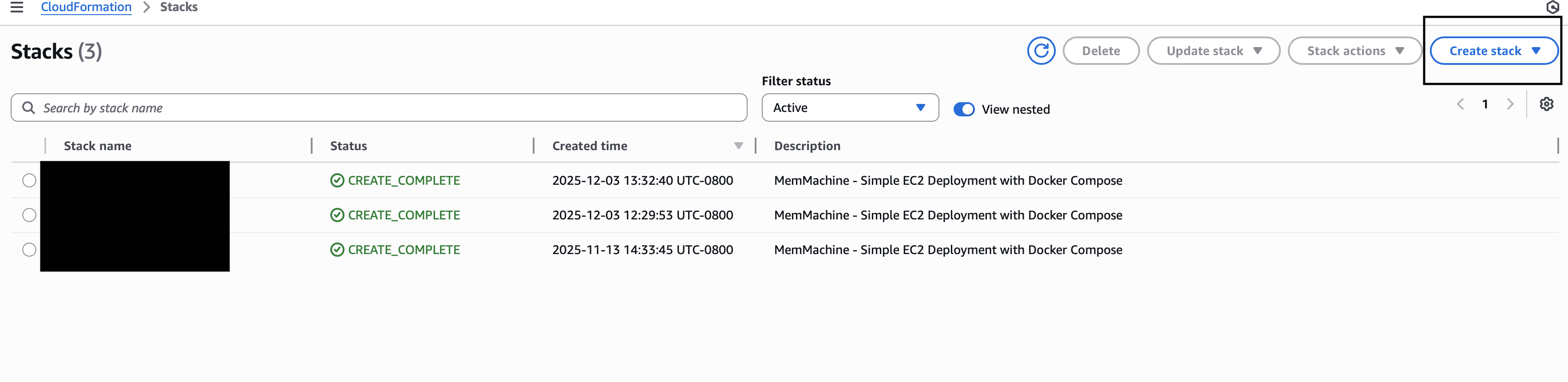
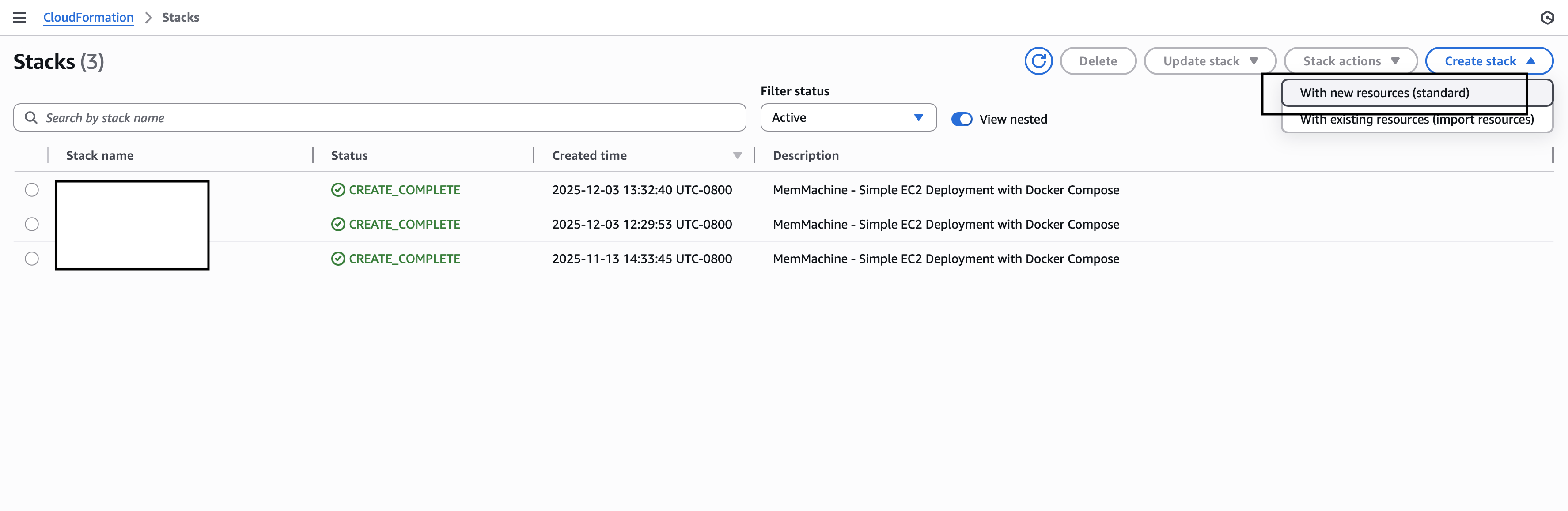
2
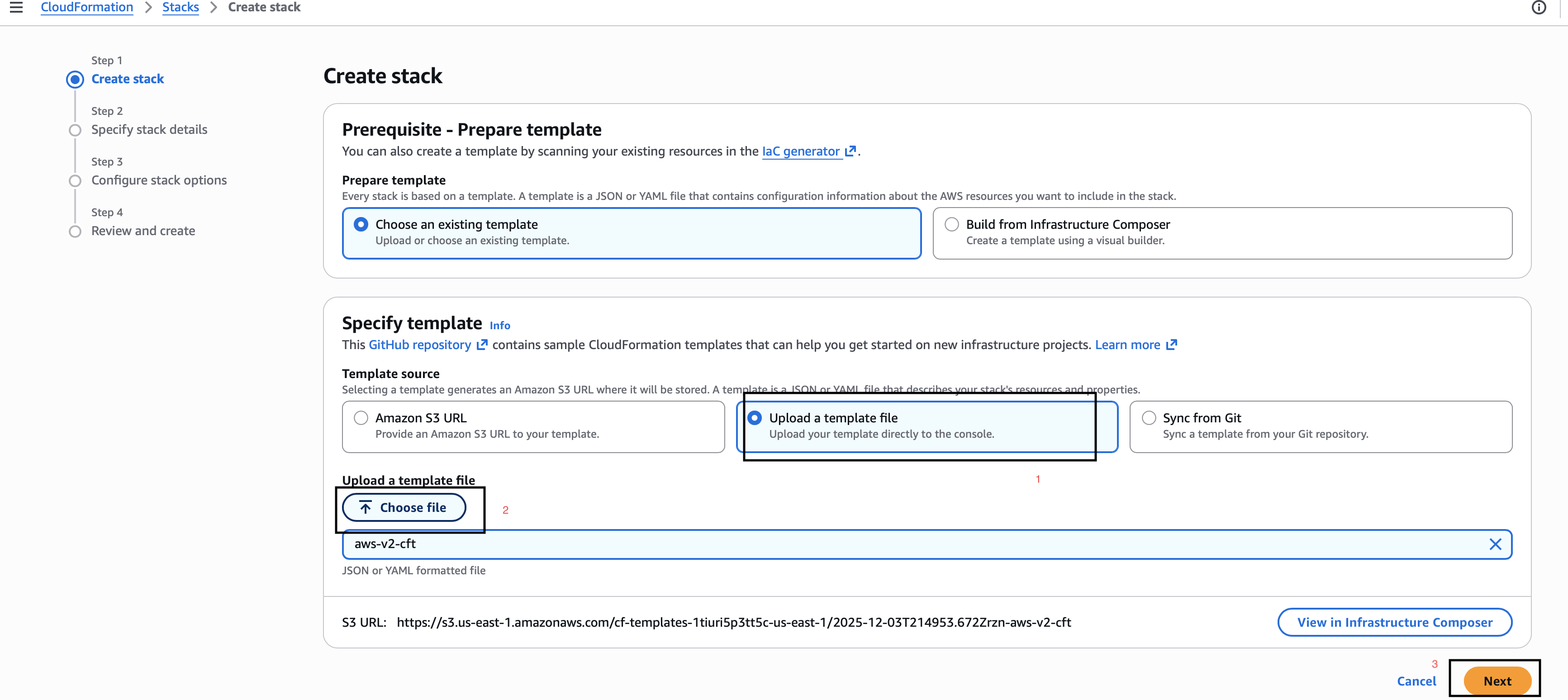
Upload your prepared template file
- Under Prerequisite - Prepare template, choose Upload a template file
-
Click Choose file and select your
memmachine-cft.yaml -
Click Next
3
Enter Stack Details
A. Stack name → 
memmachine-ec2-stack-
AllowedCIDR→0.0.0.0/0 -
ElasticIP→false -
InstanceType→t3.xlarge -
KeyPairName→ select your EC2 key pair -
PostgresPassword -
Neo4jPassword -
OpenAIApiKey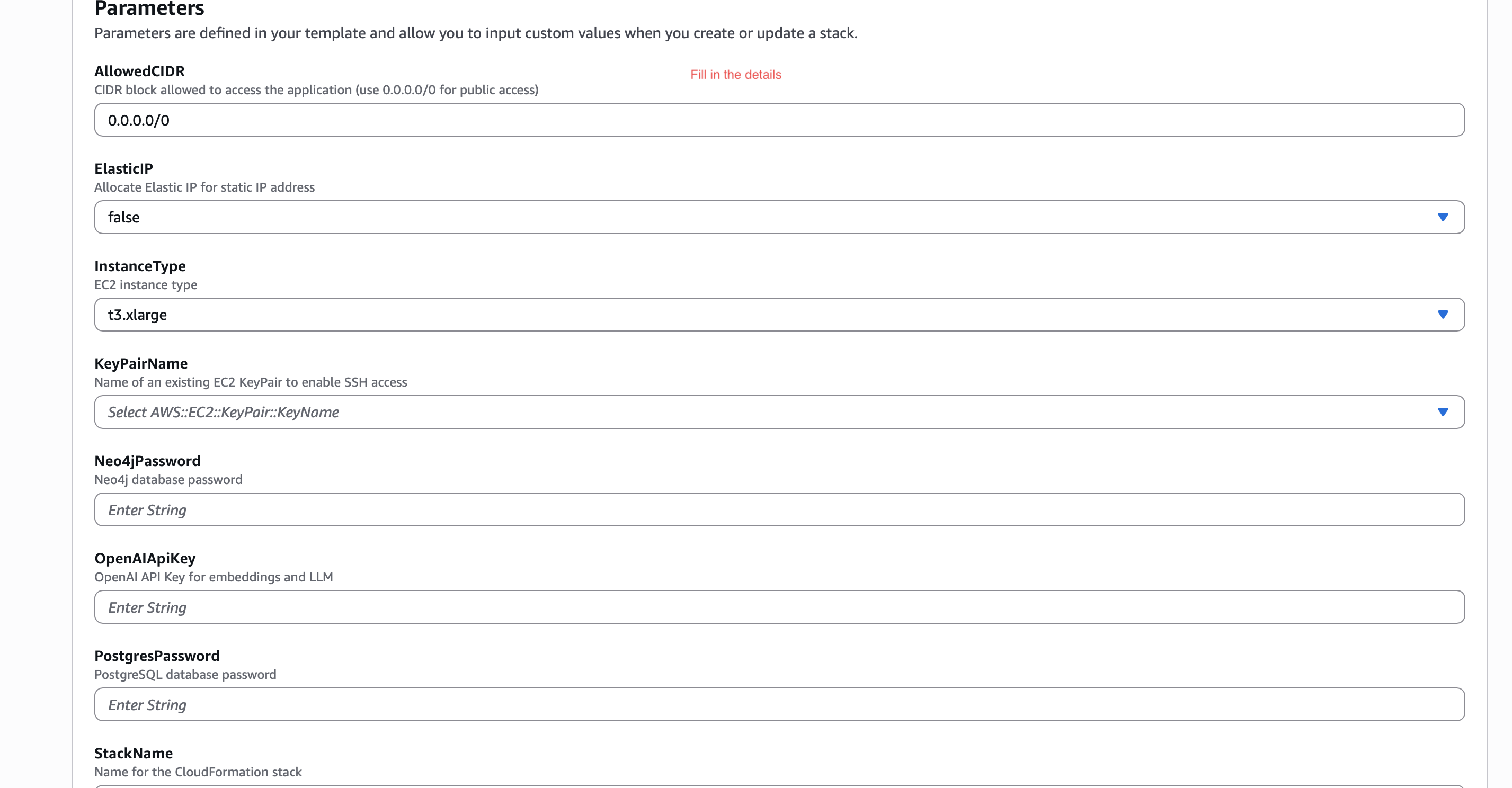
4
Configure Stack Options
A. Scroll to Permissions
B. If you have a CloudFormation IAM role (e.g., 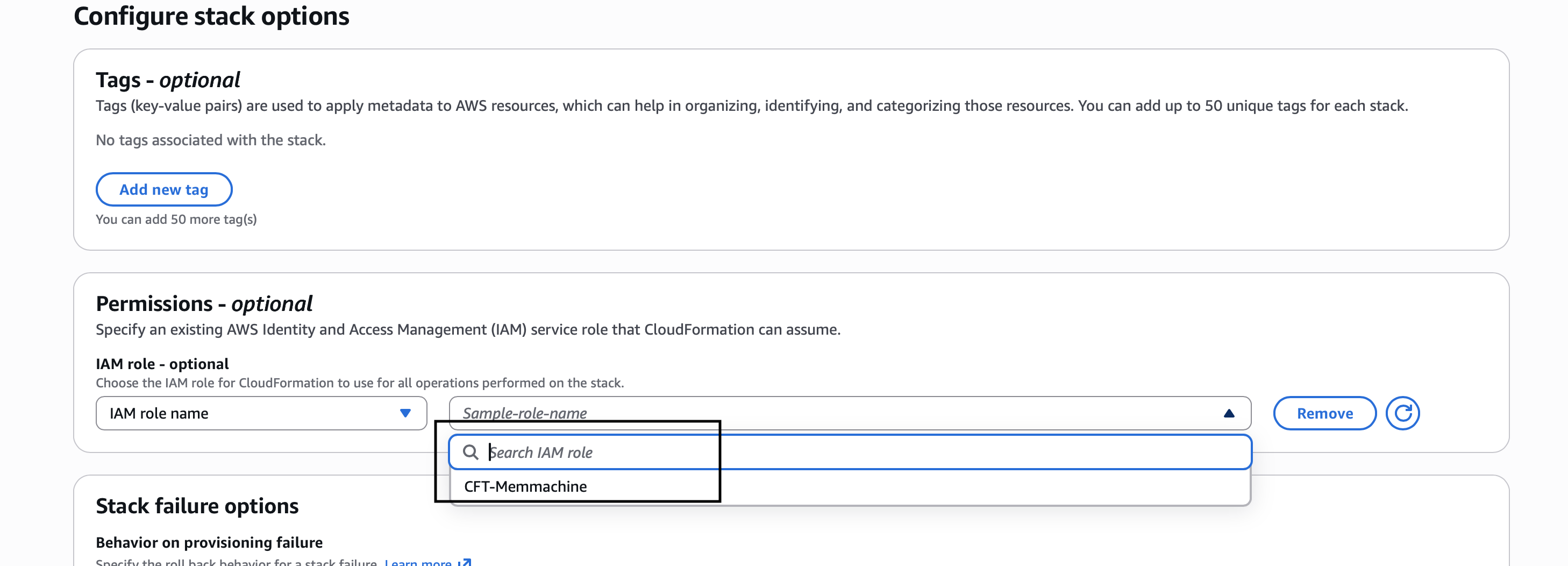
CFT-memmachine), select it
C. Otherwise create an IAM role for Cloud Formation
D. Click Next5
Review and Create
A. Scroll down
B. Check the box Acknowledge IAM resource creation
C. Click Submit
6
Wait for CREATE_COMPLETE
The stack will take a few minutes to finish.Go to AWS CloudFormation Console → https://console.aws.amazon.com/cloudformationYou will see:
Status → CREATE_COMPLETE
7
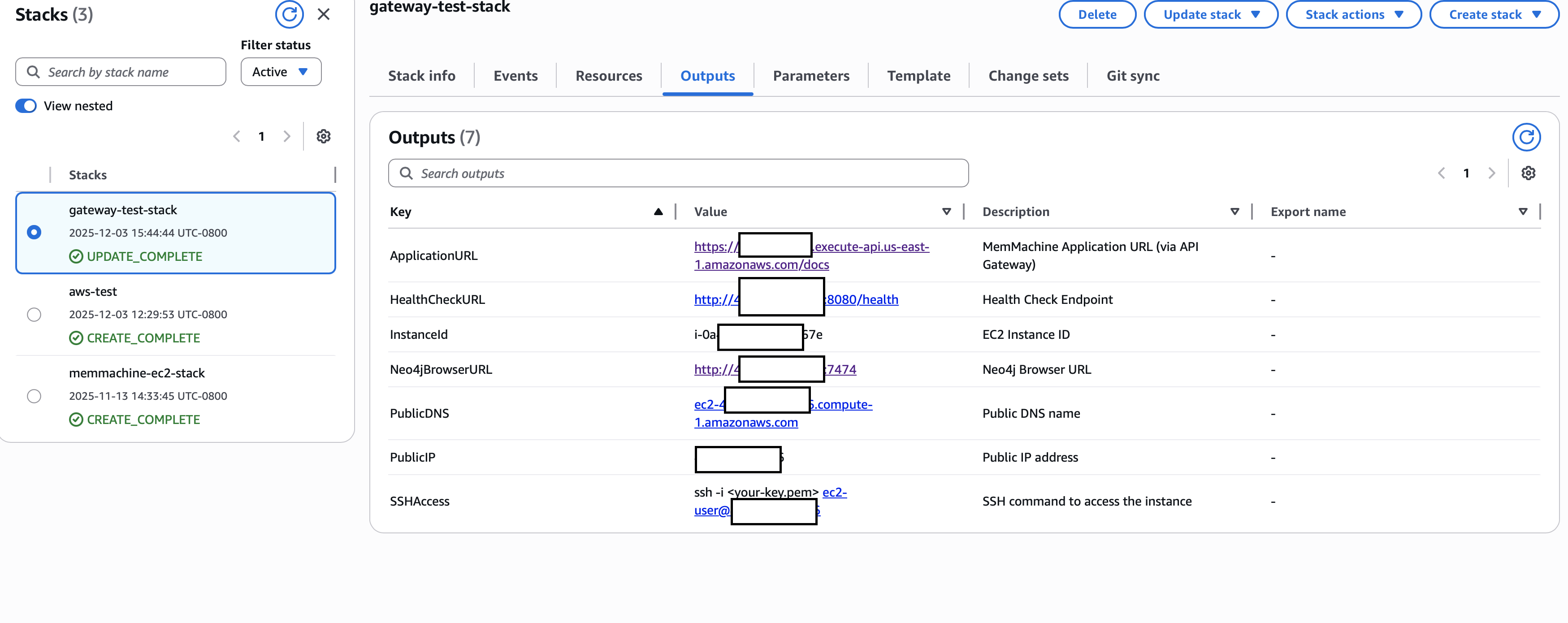
Open Outputs
Click the Outputs tab to see all auto-generated URLs:You will get:
-
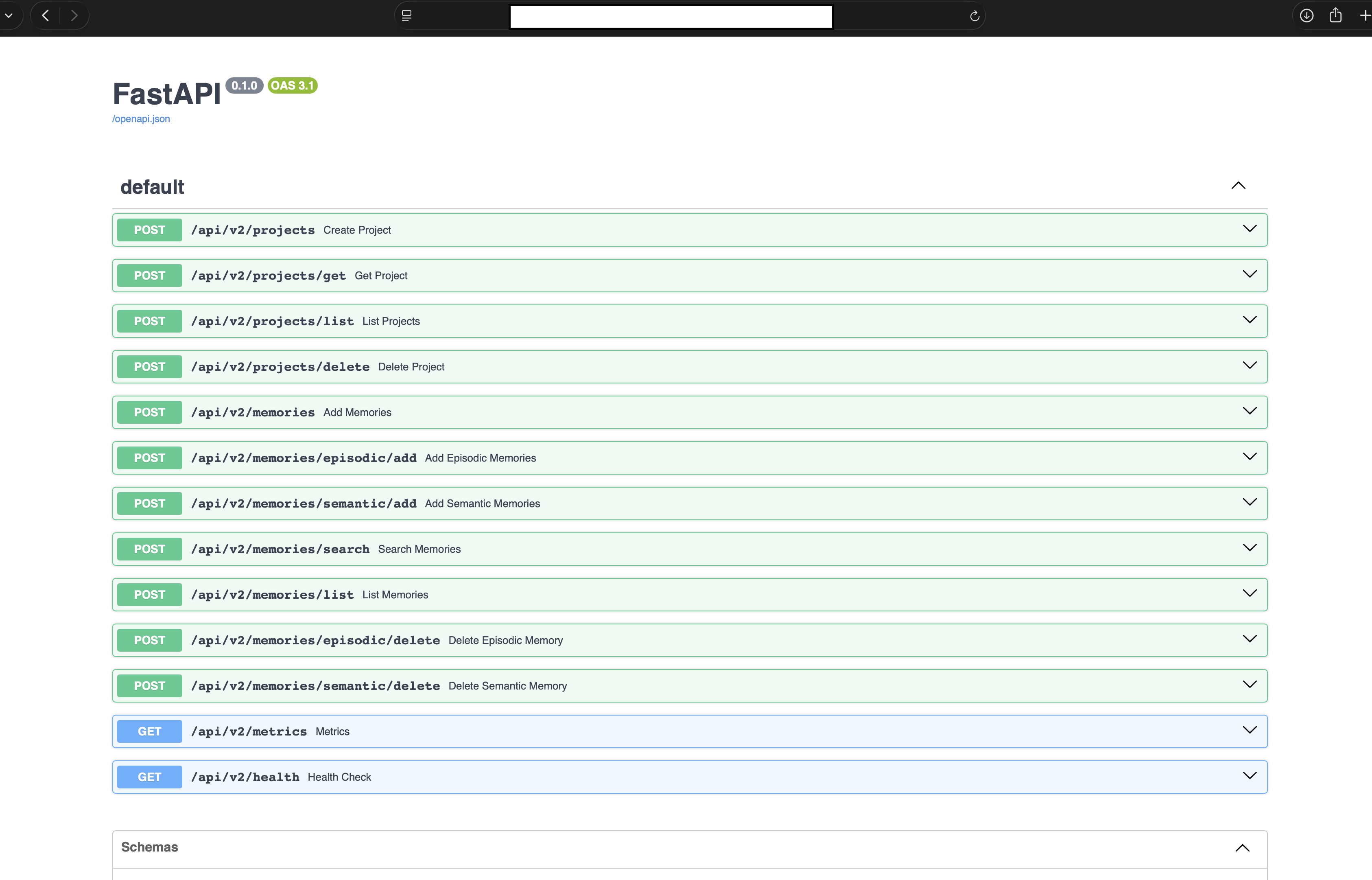
ApplicationURL → FastAPI
/docs -
HealthCheckURL →
/health - InstanceId
- Neo4jBrowserURL
- PublicIP
- PublicDNS
-
SSHAccess
8
Test the API