> ## Documentation Index
> Fetch the complete documentation index at: https://docs.memmachine.ai/llms.txt
> Use this file to discover all available pages before exploring further.
# Retrieval Agent Architecture
> How MemMachine uses intelligent orchestration to solve complex, multi-hop memory queries.
Sometimes a single vector search isn't enough. `agent_mode` adds an intelligent orchestration layer to episodic long-term memory retrieval, moving beyond simple similarity to active reasoning. Use `agent_mode=true` in your memory search APIs to handle complex questions that require more than one step to answer.
## How it Works
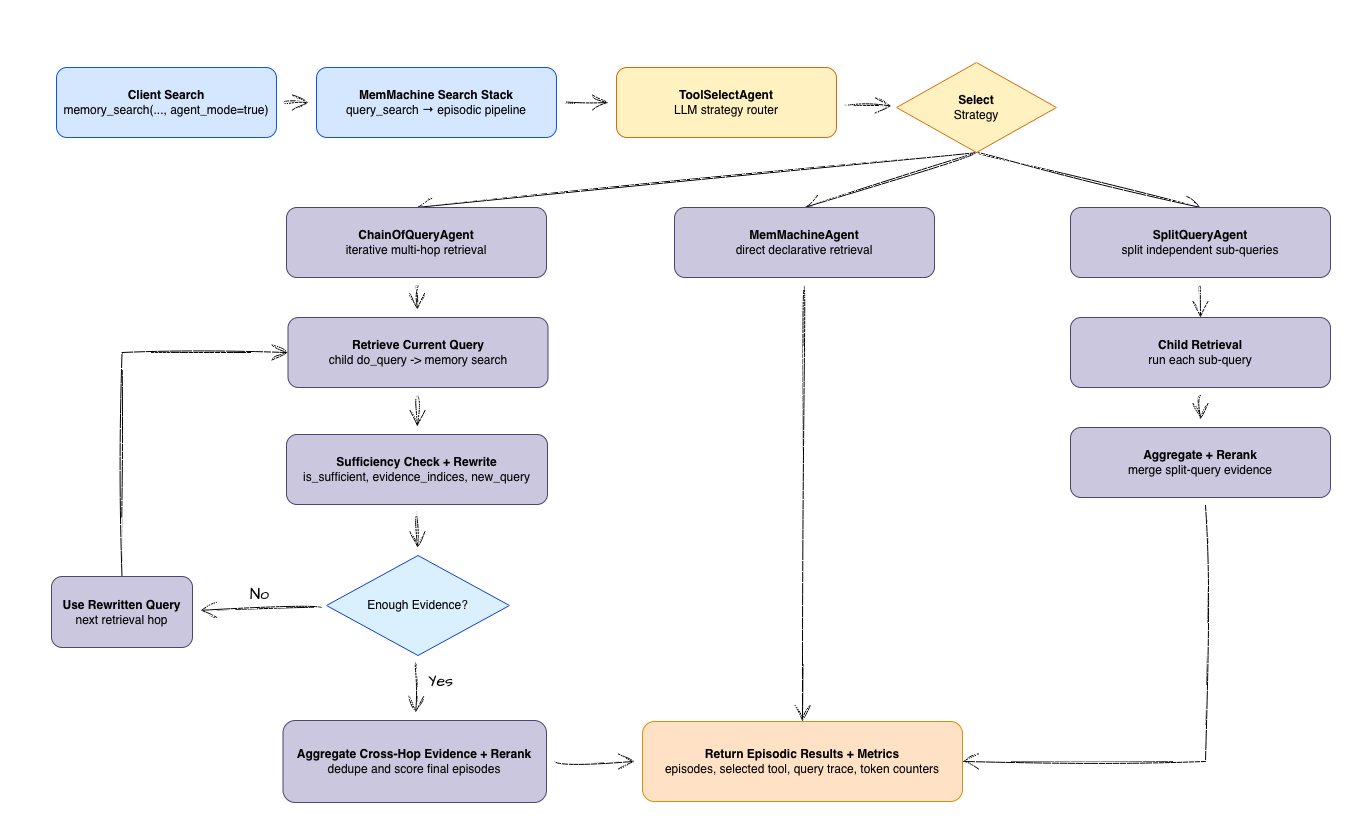
The `ToolSelectAgent` analyzes your query to decide the best path forward: a direct lookup, splitting the query into parts, or following a chain of evidence.
The orchestrator hands the query to a specialized agent that can dig through your memory based on the specific complexity of your question.
MemMachine gathers all the findings, reranks them for precision, and returns the results along with clear metrics on how it found the answer.
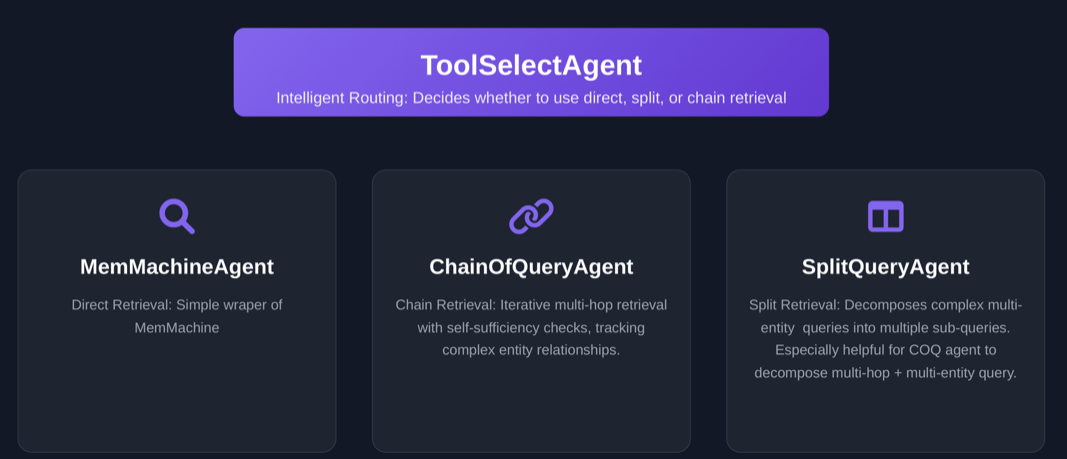 ## Agent Taxonomy
Not all queries are created equal. We use different agents to handle different levels of complexity:
| Agent | Role | Best For |
| :------------------ | :------------------ | :------------------------------------------------------------ |
| `MemMachineAgent` | Direct Retrieval | Simple, one-shot lookups. |
| `SplitQueryAgent` | Parallel Search | Queries with multiple independent entities or constraints. |
| `ChainOfQueryAgent` | Multi-hop Retrieval | Complex relationship chains where facts depend on each other. |
***
## Why Agentic Retrieval Matters
Standard vector search works great when a query maps directly to a single memory. However, real-world questions are often "messy."
`agent_mode` is designed for scenarios that require:
* **Multi-hop chains:** Where Fact B can't be found until you find Fact A.
* **Relationship traversal:** Jumping across entities (e.g., `Person` -> `Organization` -> `Role`).
* **Mixed constraints:** Filtering by time, location, and role simultaneously in steps.
* **Sufficiency checks:** Ensuring the agent doesn't stop until it actually has enough evidence.
### The "Spouse" Problem (Multi-hop struggle)
Imagine asking: *"What is the current company of the spouse of the CEO of Acme?"*
A standard search might over-focus on "Acme" and "CEO," completely missing the spouse's data because that entity hasn't been identified yet.
### How MemMachine Fixes This
1. **Detection:** `ToolSelectAgent` sees the complexity and routes to a chain-based strategy.
2. **Iteration:** `ChainOfQueryAgent` finds the CEO first, identifies the spouse, and then searches for that spouse's company.
3. **Verification:** At each step, the agent checks if it has enough info to move forward.
4. **Ranking:** All gathered evidence is combined and ranked to give you the most relevant answer.
Setting `agent_mode=false` (default) uses the standard `EpisodicMemory` path. This is faster for simple queries but may struggle with multi-step reasoning.
### Workflow Diagram
This diagram shows how our Intelligent Orchestration resolves these patterns by branching between standard and agentic paths:
## Agent Taxonomy
Not all queries are created equal. We use different agents to handle different levels of complexity:
| Agent | Role | Best For |
| :------------------ | :------------------ | :------------------------------------------------------------ |
| `MemMachineAgent` | Direct Retrieval | Simple, one-shot lookups. |
| `SplitQueryAgent` | Parallel Search | Queries with multiple independent entities or constraints. |
| `ChainOfQueryAgent` | Multi-hop Retrieval | Complex relationship chains where facts depend on each other. |
***
## Why Agentic Retrieval Matters
Standard vector search works great when a query maps directly to a single memory. However, real-world questions are often "messy."
`agent_mode` is designed for scenarios that require:
* **Multi-hop chains:** Where Fact B can't be found until you find Fact A.
* **Relationship traversal:** Jumping across entities (e.g., `Person` -> `Organization` -> `Role`).
* **Mixed constraints:** Filtering by time, location, and role simultaneously in steps.
* **Sufficiency checks:** Ensuring the agent doesn't stop until it actually has enough evidence.
### The "Spouse" Problem (Multi-hop struggle)
Imagine asking: *"What is the current company of the spouse of the CEO of Acme?"*
A standard search might over-focus on "Acme" and "CEO," completely missing the spouse's data because that entity hasn't been identified yet.
### How MemMachine Fixes This
1. **Detection:** `ToolSelectAgent` sees the complexity and routes to a chain-based strategy.
2. **Iteration:** `ChainOfQueryAgent` finds the CEO first, identifies the spouse, and then searches for that spouse's company.
3. **Verification:** At each step, the agent checks if it has enough info to move forward.
4. **Ranking:** All gathered evidence is combined and ranked to give you the most relevant answer.
Setting `agent_mode=false` (default) uses the standard `EpisodicMemory` path. This is faster for simple queries but may struggle with multi-step reasoning.
### Workflow Diagram
This diagram shows how our Intelligent Orchestration resolves these patterns by branching between standard and agentic paths:
 ***
## Configuration & Extension
You can fine-tune how these agents behave using the `extra_params` dictionary.
```python theme={null}
# Example: Tuning agent behavior for higher precision
memory.search(
query="Find the CEO of Acme's spouse's current company",
agent_mode=True,
extra_params={
"max_attempts": 3, # How many hops to allow
"confidence_score": 0.85 # Threshold for stopping early
}
)
```
**Pro Tip:** If the `ChainOfQueryAgent` isn't navigating your data correctly, check the `selected_tool` and `confidence_scores` in your metadata. You can often fix "lost" agents by providing more context in the `combined_prompt` within your config.
***
## Metrics and Telemetry
Transparency is key. We provide detailed metrics so you can see exactly how the agent "thought" through your query:
| **Metric** | **Purpose** |
| ---------------------- | -------------------------------------------------------------- |
| `selected_tool` | Identifies which agent was chosen to handle the heavy lifting. |
| `queries` | Shows the specific sub-queries generated during the process. |
| `memory_search_called` | The total number of times the agent hit the database. |
| `llm_time` | How long the orchestration/reasoning steps took. |
| `confidence_scores` | The certainty level for each hop in a chain. |
***
## Configuration & Extension
You can fine-tune how these agents behave using the `extra_params` dictionary.
```python theme={null}
# Example: Tuning agent behavior for higher precision
memory.search(
query="Find the CEO of Acme's spouse's current company",
agent_mode=True,
extra_params={
"max_attempts": 3, # How many hops to allow
"confidence_score": 0.85 # Threshold for stopping early
}
)
```
**Pro Tip:** If the `ChainOfQueryAgent` isn't navigating your data correctly, check the `selected_tool` and `confidence_scores` in your metadata. You can often fix "lost" agents by providing more context in the `combined_prompt` within your config.
***
## Metrics and Telemetry
Transparency is key. We provide detailed metrics so you can see exactly how the agent "thought" through your query:
| **Metric** | **Purpose** |
| ---------------------- | -------------------------------------------------------------- |
| `selected_tool` | Identifies which agent was chosen to handle the heavy lifting. |
| `queries` | Shows the specific sub-queries generated during the process. |
| `memory_search_called` | The total number of times the agent hit the database. |
| `llm_time` | How long the orchestration/reasoning steps took. |
| `confidence_scores` | The certainty level for each hop in a chain. |