> ## Documentation Index
> Fetch the complete documentation index at: https://docs.memmachine.ai/llms.txt
> Use this file to discover all available pages before exploring further.
# OpenClaw
> Enable persistent, long-term memory for your OpenClaw agents
The MemMachine plugin for [OpenClaw](https://github.com/OpenClaw/OpenClaw) provides a queryable long-term memory layer. By storing interaction history and retrieving high-relevance context at inference time, your agents stay grounded while reducing token waste.
Maintain context across different agent sessions without ballooning your prompt size.
Automatically inject relevant episodic and semantic memories before your agent responds.
## Features
* **Auto Recall**: Searches memories before the agent responds and injects matches into the context.
* **Auto Capture**: Automatically sends every exchange to MemMachine after the agent responds.
* **Native Functions**: Registers `memory_search`, `memory_store`, `memory_forget`, and `memory_get` directly in OpenClaw.
* **Version Support**: Requires MemMachine plugin v0.3.0 or higher.
***
## Setup
Use this command to pull the latest stable version of the plugin directly from our registry:
```bash theme={null}
openclaw plugins install @memmachine/openclaw-memmachine
```
Use this method if you are contributing to the plugin or testing local modifications. Ensure you are in the project root:
```bash theme={null}
openclaw plugins install ./MemMachine/integrations/openclaw
```
Do not use `openclaw hooks install` for this package. It is an OpenClaw plugin pack that exports `openclaw.extensions`, not a hook pack with `openclaw.hooks`.
If you are using the **MemMachine Platform (Cloud)**, retrieve your API key from the [MemMachine Cloud console](https://console.memmachine.ai).
*Note: An API key is only required when connecting to the Cloud platform. For local deployments, this field may be omitted.*
You can configure the plugin through the **OpenClaw Gateway Dashboard** under `Settings > Plugins` or by editing your `openclaw.json` file.
Add the `openclaw-memmachine` entry to your `plugins.entries` object in `openclaw.json`:
```json5 theme={null}
"openclaw-memmachine": {
"enabled": true,
"config": {
"apiKey": "mm-...",
"baseUrl": "[https://api.memmachine.ai](https://api.memmachine.ai)",
"autoCapture": true,
"autoRecall": true,
"orgId": "openclaw",
"projectId": "openclaw"
}
}
```
```json5 theme={null}
"openclaw-memmachine": {
"enabled": true,
"config": {
"baseUrl": "http://host:port/api/v2",
"autoCapture": true,
"autoRecall": true,
"orgId": "openclaw",
"projectId": "openclaw"
}
}
```
***
## UI Configuration
For a no-code approach, use the OpenClaw Gateway Dashboard to toggle features and manage identifiers.
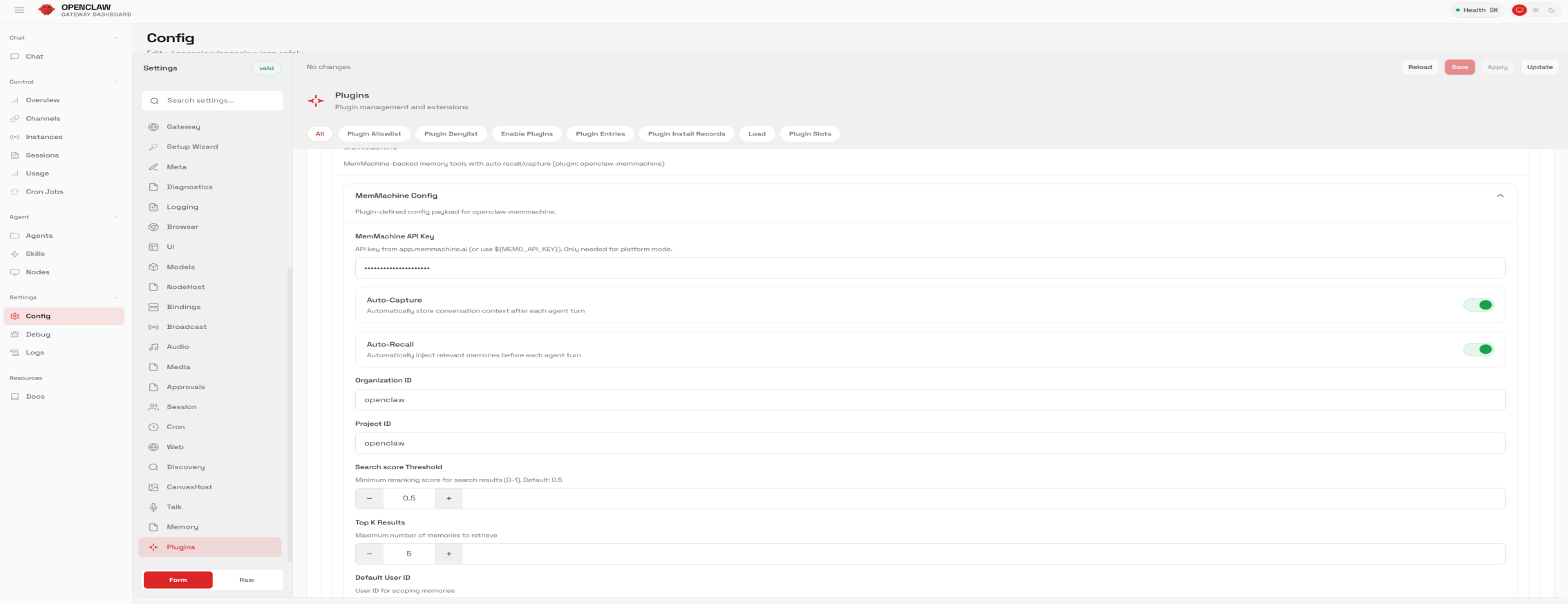 ### Configuration Parameters
| Parameter | UI Label | Description |
| :---------------- | :--------------------- | :-------------------------------------------------------------- |
| `apiKey` | MemMachine API Key | Your MemMachine API key (Required for Cloud). |
| `baseUrl` | Base URL | The MemMachine API endpoint. |
| `autoCapture` | Auto-Capture | Automatically store conversation context after each agent turn. |
| `autoRecall` | Auto-Recall | Automatically inject relevant memories before each agent turn. |
| `orgId` | Organization ID | Your unique organization identifier. |
| `projectId` | Project ID | Your unique project identifier. |
| `userId` | Default User ID | User identifier used for scoping memories. |
| `searchThreshold` | Search score Threshold | Minimum reranking score for search results (0-1). |
| `topK` | Top K Results | Maximum number of memories to retrieve per turn. |
**Pro Tip:** Tuning the **Search score Threshold** is key; a value of `0.5` is a good baseline, but increase it if your agent is recalling loosely related, noisy information.
***
## CLI Commands
The plugin registers two CLI functions for manual memory management and debugging:
* `search`: Search MemMachine memory directly from the command line.
* `stats`: Retrieve usage and health statistics from MemMachine.
### Configuration Parameters
| Parameter | UI Label | Description |
| :---------------- | :--------------------- | :-------------------------------------------------------------- |
| `apiKey` | MemMachine API Key | Your MemMachine API key (Required for Cloud). |
| `baseUrl` | Base URL | The MemMachine API endpoint. |
| `autoCapture` | Auto-Capture | Automatically store conversation context after each agent turn. |
| `autoRecall` | Auto-Recall | Automatically inject relevant memories before each agent turn. |
| `orgId` | Organization ID | Your unique organization identifier. |
| `projectId` | Project ID | Your unique project identifier. |
| `userId` | Default User ID | User identifier used for scoping memories. |
| `searchThreshold` | Search score Threshold | Minimum reranking score for search results (0-1). |
| `topK` | Top K Results | Maximum number of memories to retrieve per turn. |
**Pro Tip:** Tuning the **Search score Threshold** is key; a value of `0.5` is a good baseline, but increase it if your agent is recalling loosely related, noisy information.
***
## CLI Commands
The plugin registers two CLI functions for manual memory management and debugging:
* `search`: Search MemMachine memory directly from the command line.
* `stats`: Retrieve usage and health statistics from MemMachine.