> ## Documentation Index
> Fetch the complete documentation index at: https://docs.memmachine.ai/llms.txt
> Use this file to discover all available pages before exploring further.
# AWS CloudFormation
> MemMachine CloudFormation Deployment Guide
This single-click CloudFormation stack fully provisions a production-grade MemMachine environment on AWS. It automatically configures essential components such as the VPC, networking, security groups, EC2 instance with Docker, PostgreSQL/Neo4j databases, Network Load Balancer, and all necessary services and settings to run MemMachine reliably with your OpenAI API key.
## Prerequisites
Have the following available and ready:
1. **AWS Account** with appropriate permissions
2. **EC2 Key Pair**
* Fill out with your specific information.
```bash theme={null}
aws ec2 describe-key-pairs
--region us-east-1 aws ec2 create-key-pair \
--key-name my-memmachine-key \
--region us-east-1 \
--query 'KeyMaterial' \
--output text > my-memmachine-key.pem
chmod 400 my-memmachine-key.pem
```
3. **OpenAI API Key** — required for embeddings.
4. **Determine `STACK_NAME`**
* you will need to use the same name for this parameter throughout deployment.
* You can call the file whatever you like. In this example, we are using `memmachine-ec2-stack` or `your-stack-name`.\
If you choose to use a different name, make sure any reference to `memmachine-ec2-stack` or `your-stack-name`is replaced by your chosen stack name.
5. Cloud Formation Template - *see code block below*
* Use the copy feature below and paste into your own file
* Be sure to fill out witih your specific information where applicable
```yaml expandable theme={null}
AWSTemplateFormatVersion: '2010-09-09'
Description: 'MemMachine - Simple EC2 Deployment with Docker Compose'
Parameters:
StackName:
Type: String
Default: memmachine-ec2-stack
Description: Name for the CloudFormation stack
InstanceType:
Type: String
Default: t3.xlarge
AllowedValues: [t3.medium, t3.large, t3.xlarge, t3.2xlarge, m5.large, m5.xlarge, m5.2xlarge]
Description: EC2 instance type
KeyPairName:
Type: AWS::EC2::KeyPair::KeyName
Description: Name of an existing EC2 KeyPair to enable SSH access
PostgresPassword:
Type: String
NoEcho: true
MinLength: 8
Description: PostgreSQL database password
Neo4jPassword:
Type: String
NoEcho: true
MinLength: 8
Description: Neo4j database password
OpenAIApiKey:
Type: String
NoEcho: true
Description: OpenAI API Key for embeddings and LLM
AllowedCIDR:
Type: String
Default: 0.0.0.0/0
Description: CIDR block allowed to access the application (use 0.0.0.0/0 for public access)
Resources:
# VPC
VPC:
Type: AWS::EC2::VPC
Properties:
CidrBlock: 10.0.0.0/16
EnableDnsHostnames: true
EnableDnsSupport: true
Tags:
- Key: Name
Value: !Sub '${StackName}-vpc'
InternetGateway:
Type: AWS::EC2::InternetGateway
Properties:
Tags:
- Key: Name
Value: !Sub '${StackName}-igw'
InternetGatewayAttachment:
Type: AWS::EC2::VPCGatewayAttachment
Properties:
InternetGatewayId: !Ref InternetGateway
VpcId: !Ref VPC
# Public Subnet
PublicSubnet:
Type: AWS::EC2::Subnet
Properties:
VpcId: !Ref VPC
AvailabilityZone: !Select [0, !GetAZs '']
CidrBlock: 10.0.0.0/24
MapPublicIpOnLaunch: true
Tags:
- Key: Name
Value: !Sub '${StackName}-public-subnet'
PublicSubnet2:
Type: AWS::EC2::Subnet
Properties:
VpcId: !Ref VPC
AvailabilityZone: !Select [1, !GetAZs '']
CidrBlock: 10.0.1.0/24
MapPublicIpOnLaunch: true
Tags:
- Key: Name
Value: !Sub '${StackName}-public-subnet-2'
# Route Table
PublicRouteTable:
Type: AWS::EC2::RouteTable
Properties:
VpcId: !Ref VPC
Tags:
- Key: Name
Value: !Sub '${StackName}-public-routes'
DefaultPublicRoute:
Type: AWS::EC2::Route
DependsOn: InternetGatewayAttachment
Properties:
RouteTableId: !Ref PublicRouteTable
DestinationCidrBlock: 0.0.0.0/0
GatewayId: !Ref InternetGateway
PublicSubnetRouteTableAssociation:
Type: AWS::EC2::SubnetRouteTableAssociation
Properties:
RouteTableId: !Ref PublicRouteTable
SubnetId: !Ref PublicSubnet
PublicSubnet2RouteTableAssociation:
Type: AWS::EC2::SubnetRouteTableAssociation
Properties:
RouteTableId: !Ref PublicRouteTable
SubnetId: !Ref PublicSubnet2
# Security Group
MemMachineSecurityGroup:
Type: AWS::EC2::SecurityGroup
Properties:
GroupName: !Sub '${StackName}-sg'
GroupDescription: Security group for MemMachine EC2 instance
VpcId: !Ref VPC
SecurityGroupIngress:
- IpProtocol: tcp
FromPort: 22
ToPort: 22
CidrIp: !Ref AllowedCIDR
Description: SSH access
- IpProtocol: tcp
FromPort: 8080
ToPort: 8080
CidrIp: 10.0.0.0/16
Description: MemMachine API from VPC only
- IpProtocol: tcp
FromPort: 7474
ToPort: 7474
CidrIp: !Ref AllowedCIDR
Description: Neo4j HTTP
- IpProtocol: tcp
FromPort: 7687
ToPort: 7687
CidrIp: !Ref AllowedCIDR
Description: Neo4j Bolt
SecurityGroupEgress:
- IpProtocol: -1
CidrIp: 0.0.0.0/0
Tags:
- Key: Name
Value: !Sub '${StackName}-sg'
# IAM Role for EC2
EC2Role:
Type: AWS::IAM::Role
Properties:
RoleName: !Sub '${StackName}-ec2-role'
AssumeRolePolicyDocument:
Version: '2012-10-17'
Statement:
- Effect: Allow
Principal:
Service: ec2.amazonaws.com
Action: sts:AssumeRole
ManagedPolicyArns:
- arn:aws:iam::aws:policy/AmazonSSMManagedInstanceCore
Policies:
- PolicyName: CloudWatchLogs
PolicyDocument:
Version: '2012-10-17'
Statement:
- Effect: Allow
Action:
- logs:CreateLogGroup
- logs:CreateLogStream
- logs:PutLogEvents
- logs:DescribeLogStreams
Resource: '*'
EC2InstanceProfile:
Type: AWS::IAM::InstanceProfile
Properties:
Roles:
- !Ref EC2Role
# CloudWatch Log Group
MemMachineLogGroup:
Type: AWS::Logs::LogGroup
Properties:
LogGroupName: !Sub '/memmachine/${StackName}'
RetentionInDays: 30
MemMachineNLB:
Type: AWS::ElasticLoadBalancingV2::LoadBalancer
Properties:
Name: !Sub '${StackName}-nlb'
Type: network
Scheme: internal
Subnets:
- !Ref PublicSubnet
- !Ref PublicSubnet2
MemMachineTargetGroup:
Type: AWS::ElasticLoadBalancingV2::TargetGroup
Properties:
Name: !Sub '${StackName}-tg'
Port: 8080
Protocol: TCP
TargetType: instance
VpcId: !Ref VPC
HealthCheckPort: '8080'
HealthCheckProtocol: TCP
Targets:
- Id: !Ref MemMachineInstance
Port: 8080
MemMachineNLBListener:
Type: AWS::ElasticLoadBalancingV2::Listener
Properties:
DefaultActions:
- Type: forward
TargetGroupArn: !Ref MemMachineTargetGroup
LoadBalancerArn: !Ref MemMachineNLB
Port: 8080
Protocol: TCP
MemMachineVpcLink:
Type: AWS::ApiGatewayV2::VpcLink
Properties:
Name: !Sub '${StackName}-vpclink'
SubnetIds:
- !Ref PublicSubnet
- !Ref PublicSubnet2
MemMachineHttpApi:
Type: AWS::ApiGatewayV2::Api
Properties:
Name: !Sub '${StackName}-http-api'
ProtocolType: HTTP
MemMachineIntegration:
Type: AWS::ApiGatewayV2::Integration
Properties:
ApiId: !Ref MemMachineHttpApi
IntegrationType: HTTP_PROXY
IntegrationMethod: ANY
ConnectionType: VPC_LINK
ConnectionId: !Ref MemMachineVpcLink
IntegrationUri: !Ref MemMachineNLBListener
PayloadFormatVersion: '1.0'
MemMachineRoute:
Type: AWS::ApiGatewayV2::Route
Properties:
ApiId: !Ref MemMachineHttpApi
RouteKey: 'ANY /{proxy+}'
Target: !Sub 'integrations/${MemMachineIntegration}'
MemMachineStage:
Type: AWS::ApiGatewayV2::Stage
Properties:
ApiId: !Ref MemMachineHttpApi
StageName: '$default'
AutoDeploy: true
MemMachineInstance:
Type: AWS::EC2::Instance
Properties:
ImageId: !Sub '{{resolve:ssm:/aws/service/ami-amazon-linux-latest/amzn2-ami-hvm-x86_64-gp2}}'
InstanceType: !Ref InstanceType
KeyName: !Ref KeyPairName
SubnetId: !Ref PublicSubnet
SecurityGroupIds:
- !Ref MemMachineSecurityGroup
IamInstanceProfile: !Ref EC2InstanceProfile
UserData:
Fn::Base64: !Sub |
#!/bin/bash
set -e
# Update system
yum update -y
# Install CloudFormation helper scripts
yum install -y aws-cfn-bootstrap
# Install Docker
yum install -y docker
systemctl start docker
systemctl enable docker
usermod -a -G docker ec2-user
# Install Docker Compose
curl -L "https://github.com/docker/compose/releases/latest/download/docker-compose-$(uname -s)-$(uname -m)" -o /usr/local/bin/docker-compose
chmod +x /usr/local/bin/docker-compose
ln -s /usr/local/bin/docker-compose /usr/bin/docker-compose
# Install Git
yum install -y git
# Create application directory
mkdir -p /opt/memmachine
cd /opt/memmachine
# Create docker-compose.yml
cat > docker-compose.yml << 'COMPOSEEOF'
services:
postgres:
image: pgvector/pgvector:pg16
container_name: memmachine-postgres
restart: unless-stopped
ports:
- "5432:5432"
environment:
POSTGRES_DB: memmachine
POSTGRES_USER: memmachine
POSTGRES_PASSWORD: POSTGRES_PASSWORD_PLACEHOLDER
POSTGRES_INITDB_ARGS: "--encoding=UTF-8 --lc-collate=C --lc-ctype=C"
volumes:
- postgres_data:/var/lib/postgresql/data
healthcheck:
test: ["CMD-SHELL", "pg_isready -U memmachine -d memmachine"]
interval: 10s
timeout: 5s
retries: 5
start_period: 30s
networks:
- memmachine-network
neo4j:
image: neo4j:5.23-community
container_name: memmachine-neo4j
restart: unless-stopped
ports:
- "7474:7474"
- "7473:7473"
- "7687:7687"
environment:
NEO4J_EDITION: community
NEO4J_AUTH: neo4j/NEO4J_PASSWORD_PLACEHOLDER
NEO4J_server_bolt_thread__pool__max__size: 2000
NEO4J_server_memory_heap_initial__size: 512m
NEO4J_server_memory_heap_max__size: 1G
NEO4J_server_default__listen__address: 0.0.0.0
NEO4J_server_bolt_listen__address: 0.0.0.0:7687
NEO4J_server_http_listen__address: 0.0.0.0:7474
NEO4J_server_https_listen__address: 0.0.0.0:7473
NEO4J_PLUGINS: '["apoc", "graph-data-science"]'
volumes:
- neo4j_data:/data
- neo4j_logs:/logs
- neo4j_import:/var/lib/neo4j/import
- neo4j_plugins:/plugins
healthcheck:
test: ["CMD", "cypher-shell", "-u", "neo4j", "-p", "NEO4J_PASSWORD_PLACEHOLDER", "RETURN 1"]
interval: 30s
timeout: 10s
retries: 5
start_period: 30s
networks:
- memmachine-network
memmachine:
image: public.ecr.aws/v3z9g9t6/memmachine-v2:latest-cpu
container_name: memmachine-app
restart: unless-stopped
ports:
- "8080:8080"
environment:
POSTGRES_HOST: postgres
POSTGRES_PORT: 5432
POSTGRES_USER: memmachine
POSTGRES_PASSWORD: POSTGRES_PASSWORD_PLACEHOLDER
POSTGRES_DB: memmachine
NEO4J_HOST: neo4j
NEO4J_PORT: 7687
NEO4J_USER: neo4j
NEO4J_PASSWORD: NEO4J_PASSWORD_PLACEHOLDER
MEMORY_CONFIG: /app/configuration.yml
MCP_BASE_URL: http://localhost:8080
GATEWAY_URL: http://localhost:8080
FAST_MCP_LOG_LEVEL: INFO
OPENAI_API_KEY: OPENAI_API_KEY_PLACEHOLDER
LOG_LEVEL: INFO
volumes:
- memmachine_logs:/tmp/memory_logs
depends_on:
postgres:
condition: service_healthy
neo4j:
condition: service_healthy
healthcheck:
test: ["CMD", "curl", "--fail", "--silent", "http://localhost:8080/api/v2/health"]
interval: 30s
timeout: 10s
retries: 3
start_period: 60s
networks:
- memmachine-network
volumes:
postgres_data:
neo4j_data:
neo4j_logs:
neo4j_import:
neo4j_plugins:
memmachine_logs:
networks:
memmachine-network:
driver: bridge
COMPOSEEOF
# Replace password placeholders in docker-compose.yml
sed -i "s|POSTGRES_PASSWORD_PLACEHOLDER|${PostgresPassword}|g" docker-compose.yml
sed -i "s|NEO4J_PASSWORD_PLACEHOLDER|${Neo4jPassword}|g" docker-compose.yml
sed -i "s|OPENAI_API_KEY_PLACEHOLDER|${OpenAIApiKey}|g" docker-compose.yml
# Create .env file with actual values
cat > .env << 'ENVEOF'
POSTGRES_PASSWORD=PLACEHOLDER_POSTGRES
NEO4J_PASSWORD=PLACEHOLDER_NEO4J
OPENAI_API_KEY=PLACEHOLDER_OPENAI
ENVEOF
# Replace placeholders with actual values
sed -i "s|PLACEHOLDER_POSTGRES|${PostgresPassword}|g" .env
sed -i "s|PLACEHOLDER_NEO4J|${Neo4jPassword}|g" .env
sed -i "s|PLACEHOLDER_OPENAI|${OpenAIApiKey}|g" .env
# Create configuration.yml file with actual values (using proper YAML escaping)
cat > configuration.yml << 'CONFIGEOF'
logging:
path: mem-machine.log
level: info #| debug | error
episode_store:
database: profile_storage
episodic_memory:
long_term_memory:
embedder: openai_embedder
reranker: my_reranker_id
vector_graph_store: my_storage_id
short_term_memory:
llm_model: openai_model
message_capacity: 500
semantic_memory:
llm_model: openai_model
embedding_model: openai_embedder
database: profile_storage
session_manager:
database: profile_storage
prompt:
session:
- profile_prompt
resources:
databases:
profile_storage:
provider: postgres
config:
host: postgres
port: 5432
user: memmachine
password: POSTGRES_PASSWORD_PLACEHOLDER
db_name: memmachine
my_storage_id:
provider: neo4j
config:
uri: 'bolt://neo4j:7687'
username: neo4j
password: NEO4J_PASSWORD_PLACEHOLDER
sqlite_test:
provider: sqlite
config:
path: sqlite_test.db
embedders:
openai_embedder:
provider: openai
config:
model: "text-embedding-3-small"
api_key: OPENAI_API_KEY_PLACEHOLDER
base_url: "https://api.openai.com/v1"
dimensions: 1536
language_models:
openai_model:
provider: openai-responses
config:
model: "gpt-4o-mini"
api_key: OPENAI_API_KEY_PLACEHOLDER
base_url: "https://api.openai.com/v1"
rerankers:
my_reranker_id:
provider: "rrf-hybrid"
config:
reranker_ids:
- id_ranker_id
- bm_ranker_id
id_ranker_id:
provider: "identity"
bm_ranker_id:
provider: "bm25"
CONFIGEOF
# Replace placeholders in configuration.yml (using proper escaping for sed)
sed -i "s|OPENAI_API_KEY_PLACEHOLDER|$(echo '${OpenAIApiKey}' | sed 's/[[\.*^$()+?{|]/\\&/g')|g" configuration.yml
sed -i "s|NEO4J_PASSWORD_PLACEHOLDER|$(echo '${Neo4jPassword}' | sed 's/[[\.*^$()+?{|]/\\&/g')|g" configuration.yml
sed -i "s|POSTGRES_PASSWORD_PLACEHOLDER|$(echo '${PostgresPassword}' | sed 's/[[\.*^$()+?{|]/\\&/g')|g" configuration.yml
# Update docker-compose.yml to mount configuration.yml
sed -i '/memmachine_logs:\/tmp\/memory_logs/a\ - .\/configuration.yml:\/app\/configuration.yml:ro' docker-compose.yml
# Start services
docker-compose up -d
# Wait for services to be healthy
echo "Waiting for services to start..."
sleep 30
# Log status
docker-compose ps >> /var/log/memmachine-startup.log 2>&1
# Send completion signal to CloudFormation
/opt/aws/bin/cfn-signal -e $? --stack ${AWS::StackName} --resource MemMachineInstance --region ${AWS::Region} || true
Tags:
- Key: Name
Value: !Sub '${StackName}-instance'
Outputs:
InstanceId:
Description: EC2 Instance ID
Value: !Ref MemMachineInstance
PublicIP:
Description: Public IP address
Value: !GetAtt MemMachineInstance.PublicIp
PublicDNS:
Description: Public DNS name
Value: !GetAtt MemMachineInstance.PublicDnsName
ApplicationURL:
Description: MemMachine Application URL (via API Gateway)
Value: !Sub 'https://${MemMachineHttpApi}.execute-api.${AWS::Region}.amazonaws.com/docs'
HealthCheckURL:
Description: Health Check Endpoint
Value: !Sub 'http://${MemMachineInstance.PublicIp}:8080/api/v2/health'
Neo4jBrowserURL:
Description: Neo4j Browser URL
Value: !Sub 'http://${MemMachineInstance.PublicIp}:7474'
SSHAccess:
Description: SSH command to access the instance
Value: !Sub 'ssh -i ec2-user@${MemMachineInstance.PublicIp}'
```
## Deployment Methods
**Prerequisites**:
1. **AWS CLI** installed and configured
* To check your version, use the following commands:
```bash theme={null}
aws --version
```
* **macOS:** `brew install awscli`
* **Linux:** [AWS CLI Installation Guide](https://aws.amazon.com/cli/)
2. **AWS Credentials Configuration**:
```bash theme={null}
aws configure
# Enter:
# AWS Access Key ID
# AWS Secret Access Key
# Default region (e.g., us-east-1)
# Default output format (json)
aws sts get-caller-identity
```
**Process**:
Make sure to replace `your-cft-template.yaml` , `your-stack-name` and `your-key-pair` with the values you are using.
```bash theme={null}
aws configure
STACK_NAME="your-stack-name"
REGION="us-east-1"
KEY_PAIR="your-key-pair"
POSTGRES_PASSWORD="YourSecurePassword123"
NEO4J_PASSWORD="YourSecurePassword123"
OPENAI_API_KEY="sk-your-openai-key-here"
INSTANCE_TYPE="t3.xlarge"
ELASTIC_IP="false"
ALLOWED_CIDR="0.0.0.0/0"
```
```bash theme={null}
aws cloudformation create-stack \
--stack-name $STACK_NAME \
--template-body file://your-cft-template.yaml \
--parameters ParameterKey=StackName,ParameterValue=$STACK_NAME \
ParameterKey=InstanceType,ParameterValue=$INSTANCE_TYPE \
ParameterKey=KeyPairName,ParameterValue=$_KEY_PAIR \
ParameterKey=PostgresPassword,ParameterValue=$POSTGRES_PASSWORD \
ParameterKey=Neo4jPassword,ParameterValue=$NEO4J_PASSWORD \
ParameterKey=OpenAIApiKey,ParameterValue=$OPENAI_API_KEY \
ParameterKey=AllowedCIDR,ParameterValue=$_ALLOWED_CIDR \
ParameterKey=ElasticIP,ParameterValue=$_ELASTIC_IP \
--capabilities CAPABILITY_NAMED_IAM \
--region $REGION
```
```bash theme={null}
aws cloudformation describe-stacks \
--stack-name $STACK_NAME
--region $REGION
--query 'Stacks[0].StackStatus'
--output text aws cloudformation wait stack-create-complete \
--stack-name $STACK_NAME --region $REGION
```
```bash theme={null}
aws cloudformation describe-stacks \
--stack-name $STACK_NAME
--region $REGION
--query 'Stacks[0].Outputs'
--output table
```
**Expected Outputs include:**
* `ApplicationURL`
* `HealthCheckURL`
* `instanceID`
* `PublicIP`
* `SSHAccess`
* `Neo4jBrowserURL`
```bash theme={null}
PUBLIC_IP=$(aws cloudformation describe-stacks \
--stack-name $STACK_NAME \
--region $REGION \
--query 'Stacks[0].Outputs[?OutputKey==`PublicIP`].OutputValue' \
--output text) sleep 30 curl http://$PUBLIC_IP:8080/health`
```
Follow these steps to deploy the MemMachine CloudFormation stack entirely through the AWS Console.
A. Go to **AWS Console → CloudFormation**
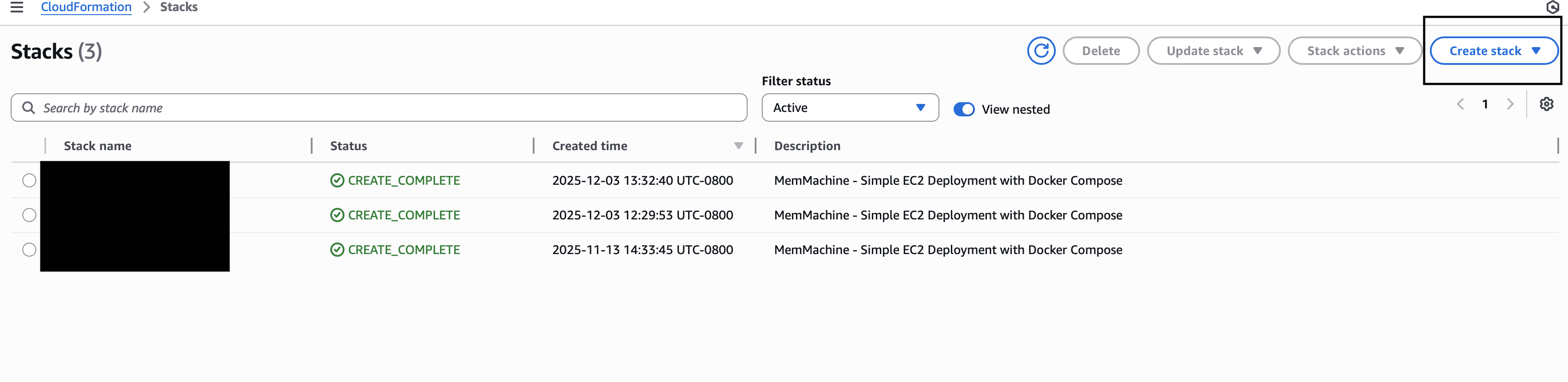 B. Click **Create stack → With new resources (standard)**
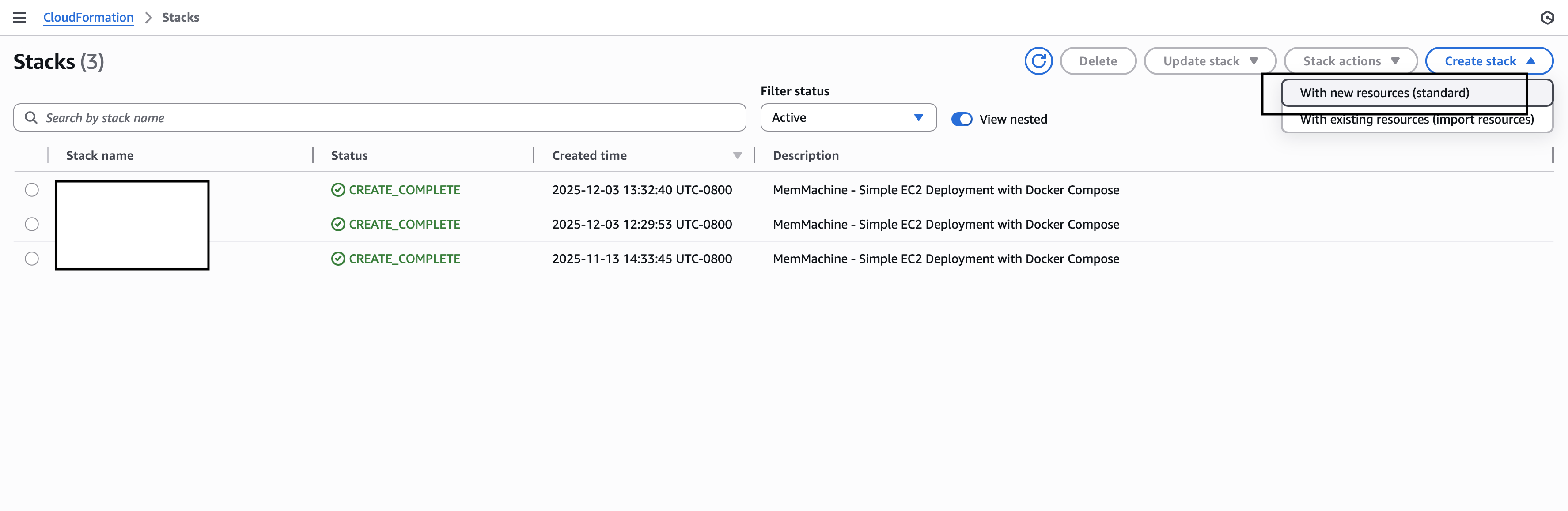 1. Under **Prerequisite - Prepare template**, choose **Upload a template file**
2. Click **Choose file** and select your `memmachine-cft.yaml`
3. Click **Next**
1. Under **Prerequisite - Prepare template**, choose **Upload a template file**
2. Click **Choose file** and select your `memmachine-cft.yaml`
3. Click **Next**
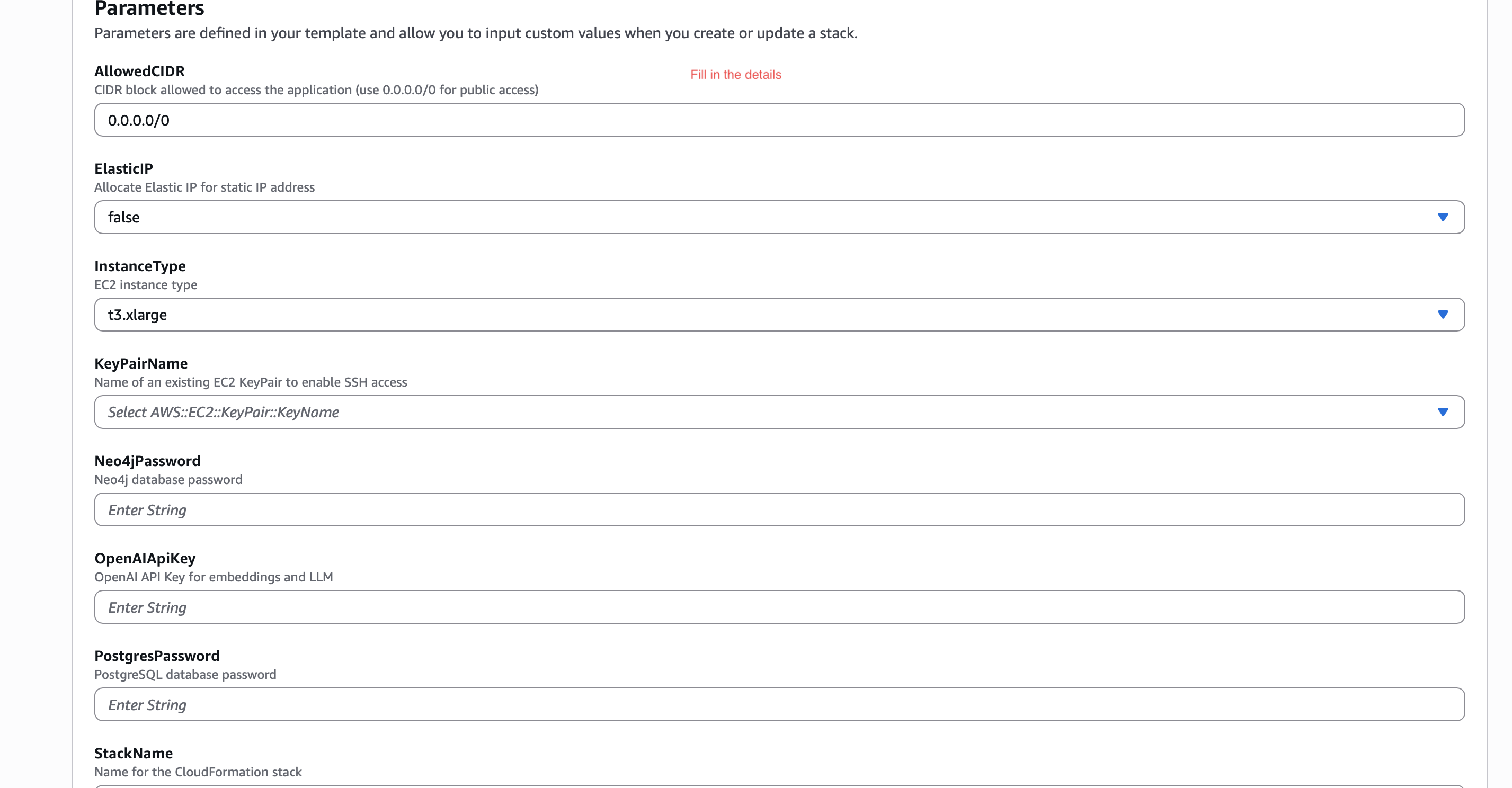
 A. **Stack name** → `memmachine-ec2-stack`
 B. Fill all required parameters:
* `AllowedCIDR` → `0.0.0.0/0`
* `ElasticIP` → `false`
* `InstanceType` → `t3.xlarge`
* `KeyPairName` → select your EC2 key pair
* `PostgresPassword`
* `Neo4jPassword`
* `OpenAIApiKey`
B. Fill all required parameters:
* `AllowedCIDR` → `0.0.0.0/0`
* `ElasticIP` → `false`
* `InstanceType` → `t3.xlarge`
* `KeyPairName` → select your EC2 key pair
* `PostgresPassword`
* `Neo4jPassword`
* `OpenAIApiKey`
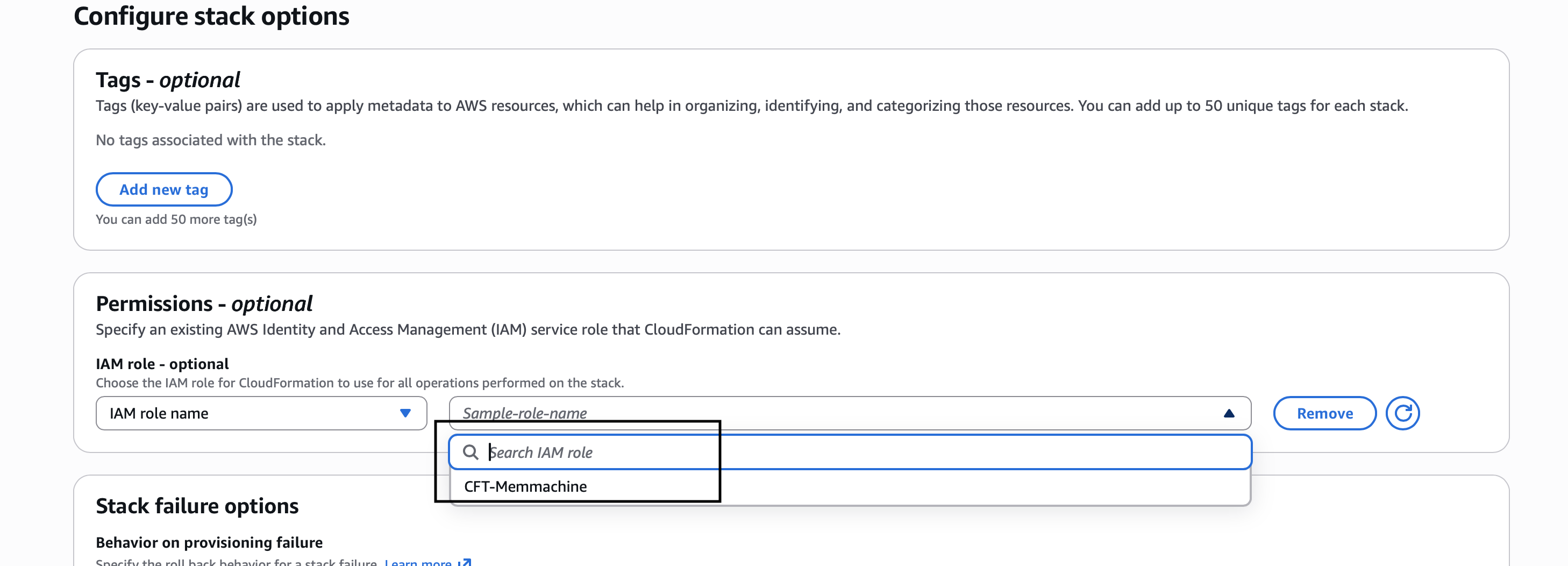
 A. Scroll to **Permissions**
B. If you have a CloudFormation IAM role (e.g., `CFT-memmachine`), select it
C. Otherwise create an **IAM role** for **Cloud Formation**
D. Click **Next**
A. Scroll to **Permissions**
B. If you have a CloudFormation IAM role (e.g., `CFT-memmachine`), select it
C. Otherwise create an **IAM role** for **Cloud Formation**
D. Click **Next**
 A. Scroll down
B. Check the box **Acknowledge IAM resource creation**
C. Click **Submit**
A. Scroll down
B. Check the box **Acknowledge IAM resource creation**
C. Click **Submit**
 The stack will take a few minutes to finish.
Go to **AWS CloudFormation Console** → [https://console.aws.amazon.com/cloudformation](https://console.aws.amazon.com/cloudformation)
You will see:
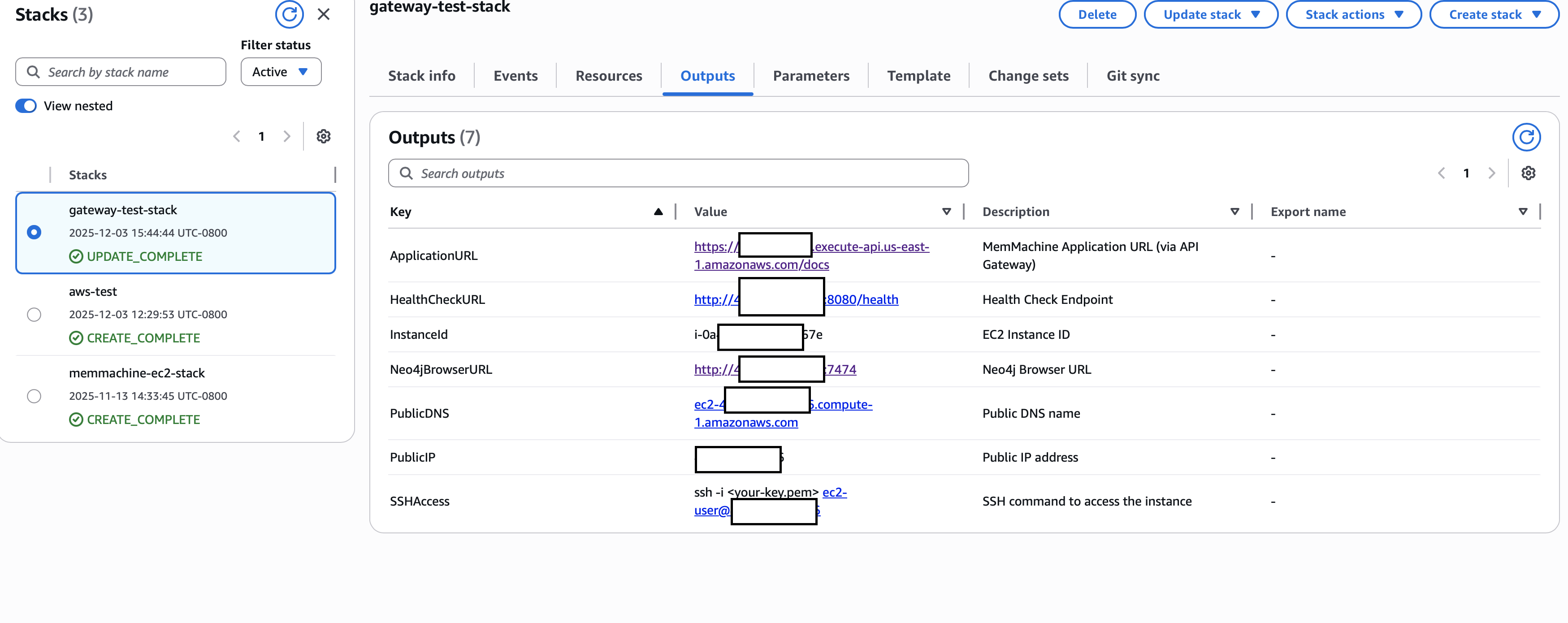
**Status → CREATE\_COMPLETE**
Click the **Outputs** tab to see all auto-generated URLs:
You will get:
* **ApplicationURL** → FastAPI `/docs`
* **HealthCheckURL** → `/health`
* **InstanceId**
* **Neo4jBrowserURL**
* **PublicIP**
* **PublicDNS**
* **SSHAccess**
The stack will take a few minutes to finish.
Go to **AWS CloudFormation Console** → [https://console.aws.amazon.com/cloudformation](https://console.aws.amazon.com/cloudformation)
You will see:
**Status → CREATE\_COMPLETE**
Click the **Outputs** tab to see all auto-generated URLs:
You will get:
* **ApplicationURL** → FastAPI `/docs`
* **HealthCheckURL** → `/health`
* **InstanceId**
* **Neo4jBrowserURL**
* **PublicIP**
* **PublicDNS**
* **SSHAccess**
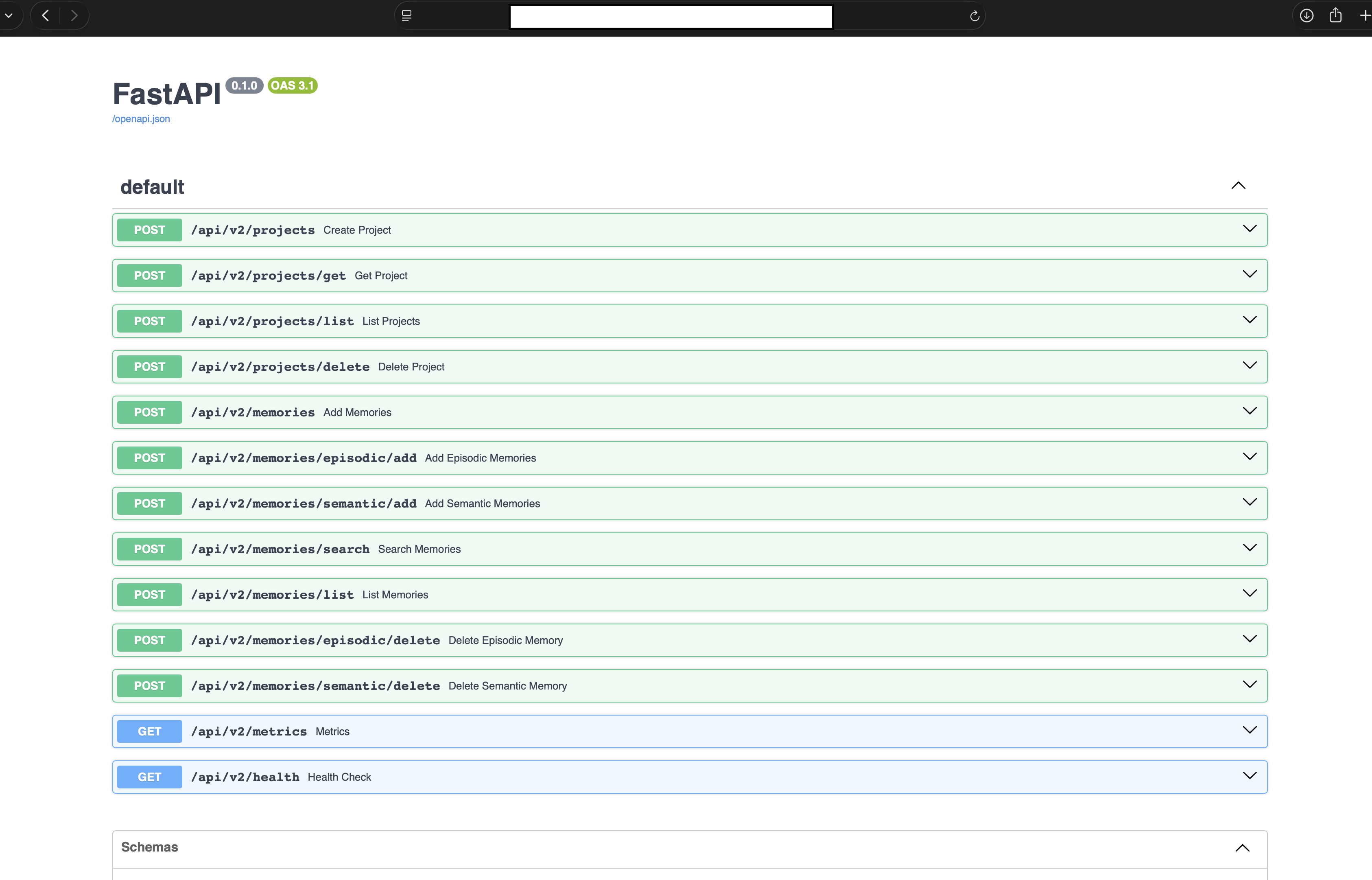
 Open:
### **MemMachine API Docs**
https\://(YOUR\_API).execute-api.us-east-1.amazonaws.com/docs
Open:
### **MemMachine API Docs**
https\://(YOUR\_API).execute-api.us-east-1.amazonaws.com/docs